Faille XSS Critical Update MD041525 et version 25.0.2
-
Bonjour,
Malgré la mise à jour en version 25.0.2 j'ai toujours le nombre de connexions refusées en hausse depuis 1 quelques jours.
Que puis-je faire ?
Dans le fichier "Echecs d'authentification" je vois tous les essais infructueux, qui ont même été tenté sur des comptes n'existant plus.
Merci d'avance de votre aide.
-
The best thing you can do to prevent unauthorized access is ensure that all of your accounts are using strong passwords. This does not prevent them from trying to authenticate, but it does ensure your accounts are safe.
Configure MDaemon to reject inbound SMTP sessions that do not have a PTR record. (Security | Security Settings | Reverse Lookups) Check the box for Perform reverse PTR record lookup on inbound SMTP connections and Send 501 and close connection if no PTR record exists. You will need to uncheck Exempt authenticated sessions. This can cause issues if you have clients connecting via the internet from IP addresses that do not have a PTR record setup.
You should also enable the options to perform lookups passed on the HELO/EHLO domain, and MAIL Command. For the mail command, enable Refuse to accept mail if a lookup returns 'domain not found'.
Use the default host screening values. (Security | Screening | Host Screen) Check the boxes for apply host screen to MSA connections, drop connection on host screen refusal, and drop connection after EHLO. The default values should be similar to this:
all localhost refuse
all friend refuse
all user refuse
all ylmf-pc refuse
all -* refuse
all *_* refuse
all #.#.#.# refuse
all *.invalid refuse
all */* refuse
all *|* refuse
all <default> refuseIf your MDaemon\app\hostscreen.dat file is empty, delete the file and restart MDaemon.
For SMTP Screening, enable block IPs that connect more than X times in Y minutes. Then adjust X and Y to be as aggressive as you can set in your environment without interferring with actual users.
Enable Dynamic Screening (Security | Dynamic Screening). Block IP addresses after A authentication failures in B minutes. Set A and B, along with all the other settings, as aggressively as you can in your environment without interferring with users.
Make sure HiJack Detection in configured in case they are ever able to guess a password, this will limit the amount of mail they can send.
Enable Location Screening. Any country where you do not have legitimate users connecting from should be configured to "Block except SMTP, disable Authentication". This will allow you to receive email from the countries, but it won't allow any authentication. If you enable it for all Continents and Countries then all authentication attempts from the internet will be rejected.
If you have users that need to authenticate and bypass location screening there are options to bypass it for known ActiveSync devices and using two factor authentication for webmail.
If you are still having issues, please share more details. What protocols are they using? Post log snippets that show the authentication attempts. Are they using consistent IP addresses? Of the settings described above what have you enabled, what can you not enable and why?
-
Hi,
Thx for your response and apalogize for my english...
Our users are using strong passwords.
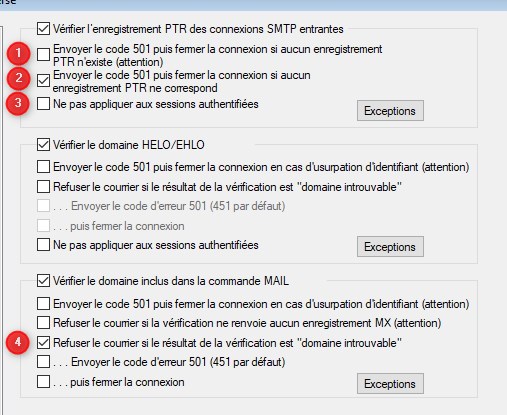
For inbound SMTP sessions, if i understand, i could check, the number 1/3/4 ? and 2 ?
Sorry, but i didn't find "Use the default host screening values. (Security | Screening | Host Screen) Check the boxes for apply host screen to MSA connections, drop connection on host screen refusal, and drop connection after EHLO" and my MDaemon\app\hostscreen.dat file is empty.
For Dynamic Screening and Location Screening it's ok, there are already actives.
Where i find HiJack Detection ?
And Two screen to estimate the evolution of refused connection :
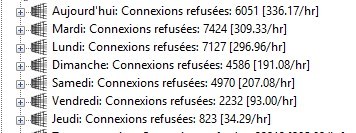
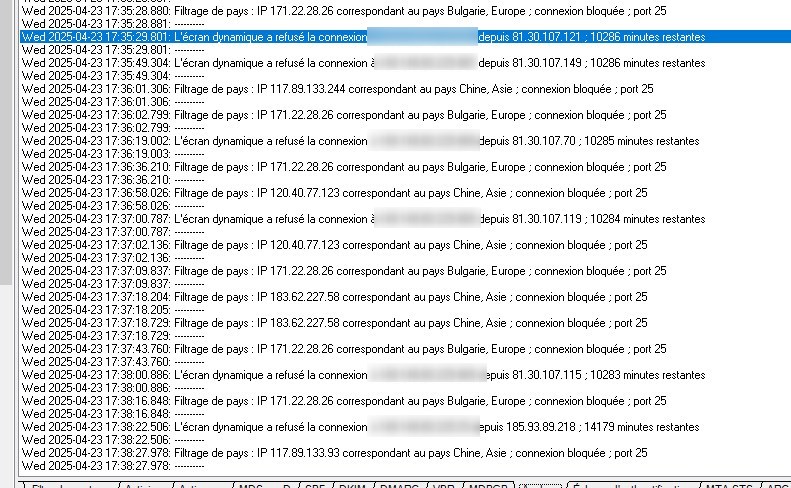
-
For inbound SMTP sessions, if i understand, i could check, the number 1/3/4 ? and 2 ?
I would only check #1, I would not check #2 or #3.
Sorry, but i didn't find "Use the default host screening values. (Security | Screening | Host Screen)
The path I provided was not complete, it should have been Security | Security Manager | Screening | Host Screen.
Where i find HiJack Detection ?
Security | Security Manager | Screening | HiJack Detection.
-
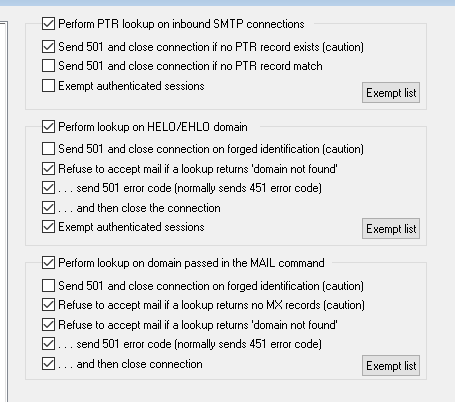
Also, in addition to "Refuse to accept mail if a lookup returns domain not found" under Perform lookup on domain passed in the mail command, I would also check "Refuse to accept mail if a lookup returns no MX records."
I also would require the HELO/EHLO domain to exist.
Here is a screen shot of what I would leave checked.