Calendar reminder Issue
-
Hello,
I am experiencing issue with reminder in calendar appointment.
I have a recursive appointment where there are 7 attendees. Two of them does not received the reminder via email even though the settings in the mdaemon calendar are setted well.
All of them are internal mailbox.These two users receive reminder from other appointment correctly.
I can not deleted the appointment and recreate it.
Someone can help me?
-
What version of MDaemon are you using?
What theme are the users using in webmail?
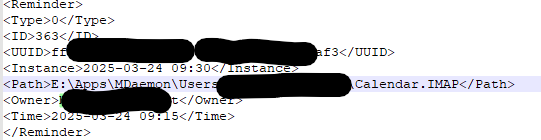
Is there an entry in the MDaemon\App\Reminders.dat file for the users that do not receive the reminder? If there is an entry, can you post the <Reminder> data for us?
If there is, is the path to their calendar folder set correctly?
-
MDaemon version is 24.5.2
In the Webmail we are using WorldClient
In the file there is the entry for these uses regarding the appointment impacted by the issue. I think that the calendar folder is set correctly.
-
Hello,
Mdaemon Versionis 24.5.2
webmail theme is WorldClient
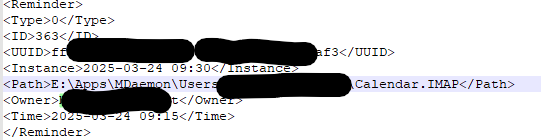
there is the entry for these users, you can find below the img.
-
My apologies for the delay in responding.
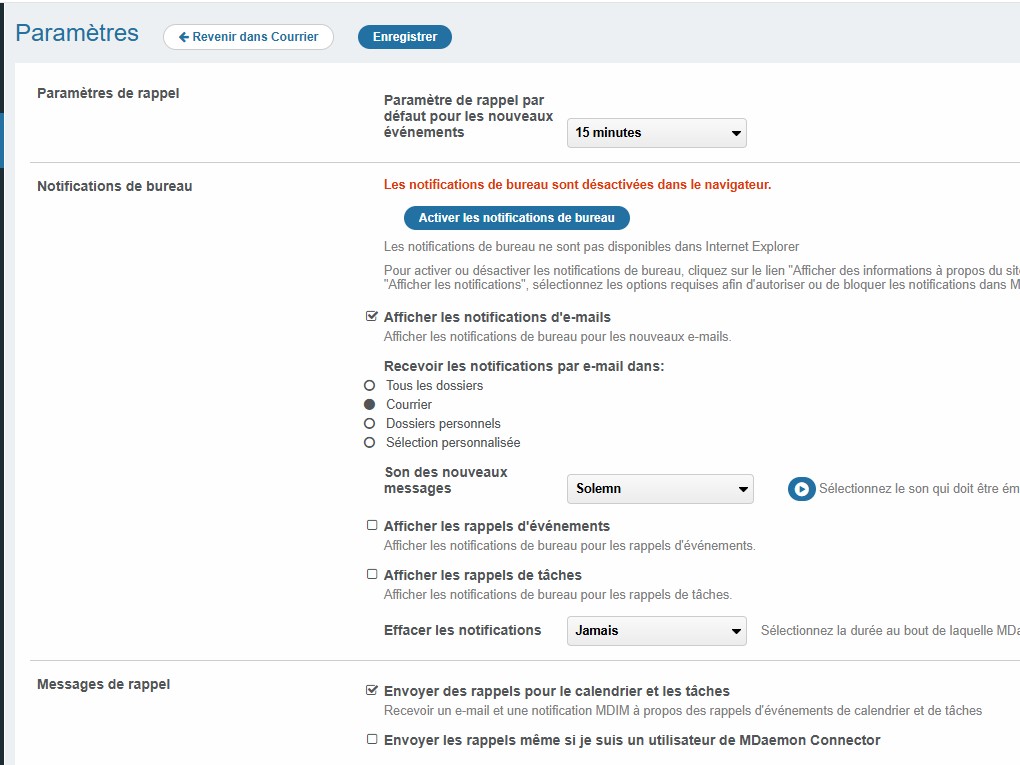
Have you the user login to webmail and go to Options / Notifications, Which options are enabled in the Reminders section? Can you post a screen shot?
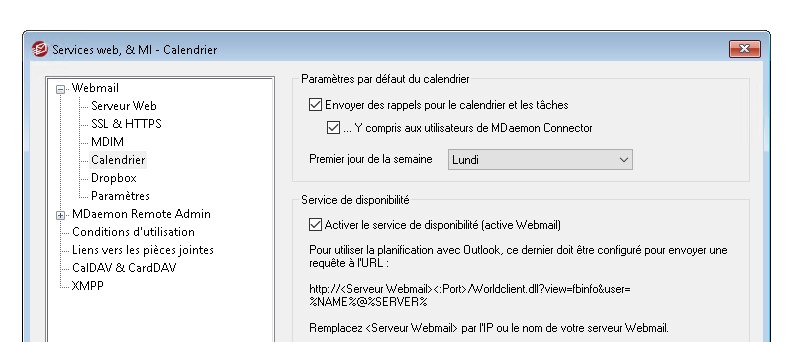
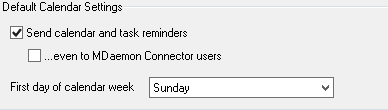
In MDaemon under Setup / Web & IM Services / Webmail / Calendar, is the option enabled to Send calendar and task reminders?
Is the box checked for "even to MDaemon Connector users"?
-
Hello,
the reminder are enabled in his webmail option, following a screen shot

Also in the Mdaemon the option is set.
-
Hello,
I'm also having problems receiving calendar reminders by email.
Has the problem been solved?
MDaemon 25.0.2
WordClient
-
@GUILBERT
Have you the user login to webmail and go to Options / Notifications, Which options are enabled in the Reminders section? Can you post a screen shot?
In MDaemon under Setup / Web & IM Services / Webmail / Calendar, is the option enabled to Send calendar and task reminders?
Is the box checked for "even to MDaemon Connector users"?
-

-

-
@GUILBERT
Is the meeting recurring?
How many attendees are in the meeting?
What is the reminder time configured for the meeting? What time does the meeting start?
How many attendess receive the reminder?
Are all attendees in the same time zone? Is the server in the same time zone? What time zone is it?
Is it always the same users that do not receive the reminders?
Do the users that do not receive the reminders receive reminders for other meetings?
Is there an entry in the MDaemon\App\reminders.dat file for each person that should have received the reminder but did not?
Are the users that are not receiving reminders configured as authorized accounts to use MDaemon Connector? (Main | MDaemon Connector | Authorized Accounts)
For each user that does not receive the notification, please login to webmail as the user and go to Options / Notifications and confirm that "Send calendar and task reminders" is checked. If the user is listed as an authorized user for MDaemon connector, also check "Send reminders even if I am an MDaemon Connector user"
In MDaemon's RAW log, is there an entry that shows MDaemon attempting to create the reminder for the users that are not receiving them? It should look something like this:
Thu 2025-06-19 13:32:16.348: ----------
Thu 2025-06-19 14:45:13.305: Converting <C:\MDaemon\Queues\Raw\md2501000184889.raw>
Thu 2025-06-19 14:45:13.306: From: MDaemon@mdaemon.com
Thu 2025-06-19 14:45:13.306: To: User@mdaemon.com
Thu 2025-06-19 14:45:13.306: Subject: Calendar reminder: Call with Joe 06/19/2025 03:00 PM
Thu 2025-06-19 14:45:13.306: Message-ID: MDAEMON0002202506191445.AA4513305@imap.mdaemon.com
Thu 2025-06-19 14:45:13.306: Conversion completed (created c:\mdaemon\queues\local\md2501000792305.msg)
Thu 2025-06-19 14:45:13.306: ----------
-
In fact, it's a matter of receiving reminders for events specific to the user, such as "Remember to do this on June 20, 2025 at 2:00 PM"
And for the case in question, i.e. my own account, I don't use MDaemon Connector.As far as I know, the problem has been noticed since I started (as system administrator) to migrate accounts to a new domain. Is there a link?
There is nothing in MDaemon's RAW log
-
@GUILBERT
This thread was about calendar reminders for a recurring event that some users do not receive the reminder for, Is that not the issue you are having? If its not, please describe the issue. Are you having issues with reminders for items in your calendar or reminders for tasks? Or Both? Does it effect all users, all calendar events, all task reminders? only some users only some events, etc...
And for the case in question, i.e. my own account, I don't use MDaemon Connector.
Even if you do not use MDaemon Connector, your account may have been added to the authorized list previously. Please check (Main | MDaemon Connector | Authorized Accounts) and verify your account is not listed.
As far as I know, the problem has been noticed since I started (as system administrator) to migrate accounts to a new domain. Is there a link?
Anything is possible. please answer the rest of the questions from my last post so that we can try to narrow it down.
-
Hello,
after several tests and analyses, I have found that calendar event reminders by e-mail work well if the events have been created by the user from his new domain :
- event created by user@newdomain -> reminder ok
- event created by user@oldomain -> no reminder (and no trace in RAW logs)as a result, all events created before migration to the new domain don't work, which is annoying for recurring events, for example.
-
@GUILBERT
For events that were created by user@olddomain, are there entries in the MDaemon\App\reminders.dat file for each person that should receive the reminder?
The reminders.dat should have an entry similar to this for each reminder that each user should receive.
<Reminder>
<Type>0</Type>
<ID>4</ID>
<UUID>f9a21905-03ba-4589-aad5-18d5e8e73330</UUID>
<Instance>2025-07-14 14:00</Instance>
<Path>C:\MDaemon\Users\domain.com\user\Calendar.IMAP</Path>
<Owner>user@domain.com</Owner>
<Time>2025-07-14 13:45</Time>
</Reminder>
Are the <Owner> using the new domain or old domain?
Is the <Path> pointing to the correct location on disk?
-
Hello,
no there is no entry in the Reminders.dat file with the user account as owner on the old domain :
<Owner> -> always new domain
<Path>-> the path is correct for events created since the domain migration, otherwise it's the path that points to the old domain folder.
Do I have to manually modify the file to restore the situation?
-
Are there entries in the reminders.dat file for the events that were created by user@olddomain (the events that you are not getting reminders for). The reminder entry should not have user@olddomain as the <Owner> but there should still be a reminder entry for the event.
Alternatively, please pick an event (preferably recurring) that a user is not receiving reminders for, send me the subject and start time for the event, along with the Calendar.mrk file where the event exists, the full path where the calendar.mrk file came from, the new and old email address for the user that owns the calendar.mrk file and is not receiving reminders, along with a copy of the reminders.dat file.
Please zip all the information and upload it to us using the following URL:
https://mdaemon.sharefile.com/r-rc3922c1eed334d4dbf5e34f0bd04ccd6
Once the upload is complete, please let us know the name of the file you uploaded.
-
Thx Arron, .zip uploaded : old_newDomain.zip
-
@GUILBERT
The meeting you provided occurred in the past. Entries are removed from the reminders.dat file once the reminder is sent. So when we look at a meeting in the past, I can't tell what happened. I'm trying to understand the state of the reminders.dat file before the time reminder should be sent. Do you have a meeting that occurs in the future that you expect a reminder will not be sent for?
Or do you have a backup of the reminders.dat file from before 2025-06-25 08:30 and after the last modified time of the meeting (2025-06-17 10:33:46)?
-
I have upload 2 backup of reminders.dat, but at this tilme this user was not migrated, he was on the old domain
- 1 / 2
- 2