 English
 Chinese (Simplified)
 French
 German
 Italian
 Japanese
 Russian
 Spanish
 Vietnamese

Please add Session ID to Custom Button Links in Pro Theme
-
Let me start off by explaining that we use "Custom Buttons" for employee Sick/Vacation time reports as well as customized HR docs. This allows us to customize the available options according the each employee by adding keys to each users "user.ini" file. This still works without modifications in Lookout and Worldclient but the new Pro theme requires the following steps to get the custom buttons working in the Pro Theme after every update.
First here's what the button dropdown and associated links (shown at the bottom of the image) look like after modifications .
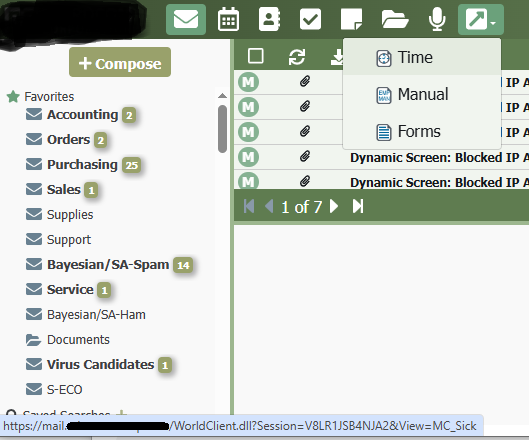
Here's an example of a user.ini file with our custom keys:
[User]
MC_ViewSick=Yes <--Should employee see Sick/Vacation Time Reports?
MC_ViewEmpMan=Yes <--Should employee see employee manual
MC_ViewSTDMan=Yes <--Should employee see Short Term Disability Plan Docs?
MC_ViewLTD1Man=Yes <--Should employee see Long Term Disability Plan Docs?
MC_ID_JSMITH=Yes <--This is the first inital and lastname of this user.ini file owner (use email prefix)
MC_MYEMPLOYEES=YES <--Does this user have employees?
MC_MYEMPLOYEES_ACOOK=YES <--Enter email prefix (first half) of employee 1
MC_MYEMPLOYEES_BCOOK=YES <--Enter email prefix (first half) of employee 2
and so on ...The time report template and other templates are stored in "C:\Mdaemon\WorldClient\Templates\LookOutMicro\" and contain:
<!DOCTYPE HTML PUBLIC "-//W3C//DTD HTML 3.2//EN"><HTML><HEAD><META HTTP-EQUIV="Content-Type" CONTENT="text/html; CHARSET=<$CharSet$>"><LINK REL="STYLESHEET" TYPE="text/css" HREF="<$THEME$>/<$Style$>.css"><SCRIPT LANGUAGE="JavaScript" TYPE="text/javascript" SRC="<$THEME$>/globals.js"></SCRIPT></HEAD><BODY style="opacity:1.0"><TABLE WIDTH="100%" BORDER="0" CELLSPACING="0" CELLPADDING="0"><TR><TD CLASS="MC_HeaderBar">My Time Report</TD></TR></TABLE><$IF USER:MC_ID_ACOOK$><HR><$INCLUDE:HR\ACOOK$><$ENDIF$><$IF USER:MC_ID_BCOOK$><HR><$INCLUDE:HR\BCOOK$><$ENDIF$><$IF USER:MC_ID_CCOOK$><HR><$INCLUDE:HR\CCOOK$><$ENDIF$><$IF USER:MC_ID_DCOOK$><HR><$INCLUDE:HR\DCOOK$><$ENDIF$>...<TABLE WIDTH="100%" BORDER="0" CELLSPACING="0" CELLPADDING="0"><TR><TD CLASS="MC_HeaderBar">My Employees Time Report</TD></TR></TABLE><$IF USER:MC_MYEMPLOYEES$><$IF USER:MC_MYEMPLOYEES_ACOOK$><HR><$INCLUDE:HR\CCOOK$><$ENDIF$><$IF USER:MC_MYEMPLOYEES_ACOOK$><HR><$INCLUDE:HR\CCOOK$><$ENDIF$><$IF USER:MC_MYEMPLOYEES_ACOOK$><HR><$INCLUDE:HR\CCOOK$><$ENDIF$><$IF USER:MC_MYEMPLOYEES_ACOOK$><HR><$INCLUDE:HR\CCOOK$><$ENDIF$>...<$ENDIF$></BODY></HTML>The actual target time reports are html files named to match the employees email prefix "acook.html" and are located in "C:\Mdaemon\WorldClient\Templates\LookOutMicro\HR".
The other forms and manuals are stored in:
"C:\Mdaemon\WorldClient\HTML\LookOutMicro\"We have a script that updates all of the reports, generates the templates with users and copies the files to each template folder. Worldclient, Lookout and Pro (which stores them in a slightly different location).
Since the Pro theme does not add the WorldClient.dll?Session portion I do the following for every MDaemon update.
Steps...
Navigate to the folder "C:\Mdaemon\WorldClient\HTML\webmail\assets\" and then search .js files for custom-link or .link,target: (The .link part will have a letter before it like F.link,target)
Insert the following: "https://mail.ourdomain.com/WorldClient.dll?Session=" + sessionStorage.session + "&" + between the href: and the F.link.
In this case the resulting change will look like:
href:"https://mail.ourdomain.com/WorldClient.dll?Session=" + sessionStorage.session + "&" + F.link,targetExample link:
https://mail.ourdomain.com/WorldClient.dll?Session=TI57OU2I55PAW&View=MC_SickMake sure that MC_EmployeeManual.html and other MC_ files are located in "\Mdaemon\WorldClient\Templates\ProMicro"
and
HR-EmployeeManual.pdf and other files linked to in the MC_ files are in "\Mdaemon\WorldClient\HTML\ProMicro"
Without this modification the links will fail and redirect to the login page.
I would like to have the ability to add the full URL with the session part (WorldClient.dll?Session={SESSION}) in the custom button link dialog in Webadmin or even by directly editing the buttons.json file. The last time I checked it looked like the URL format was restrictive and even if I did manually get the (WorldClient.dll?Session={SESSION} tag) portion inserted, I don't believe the Pro Theme parses for variables like {SESSIONID} like the older themes. So for the last couple of years I've just been inserting the full URL link into the Javascript file as described above. I'm open for suggestions but I thought I'd ask here since the Pro Theme seems to be the future. Thanks for reading this long post.
https://mail.ourdomain.com/WorldClient.dll?Session=" + sessionStorage.session + "&" + F.link,target
-
 Jonathan Staff
