 English
 Chinese (Simplified)
 French
 German
 Italian
 Japanese
 Russian
 Spanish
 Vietnamese

SecurityGateway 11.0.0 has been released
-
SecurityGateway 11.0.0 is now available! It can be downloaded from https://mdaemon.com/pages/downloads-security-gateway-free-trial.
SecurityGateway 11.0.0 - June 23, 2025
SPECIAL CONSIDERATIONS
- [26062] The database has been updated to Firebird 5.0. This update requires the database file to be converted to the Firebird 5.0 format.
The conversion process will be performed automatically during installation and may take several minutes to complete, depending on the size of the database and the performance of the disk where it is stored. During this time, SecurityGateway will be unavailable.
Before the update, a backup of the database file will be created. The backup file, named SecurityGateway.fb3, will be stored in the SecurityGateway\App directory.
Please note that once the database file has been updated, it will no longer be compatible with earlier versions of SecurityGateway.
MAJOR NEW FEATURES
- [28700] Added AI Classification feature that leverages artificial intelligence to analyze email content and classify messages based on configurable criteria.
Administrators are able to configure AI models from various providers including OpenAI/ChatGPT, Google Gemini, and custom API endpoints. The system allows the creation of custom AI prompts using message data variables that ask the AI to classify messages into administrator defined categories. Classification rules can be used to trigger specific actions based on the AI's classification results.
Any model that supports the OpenAI API format can be used, including local models running on your own infrastructure. Users are responsible for obtaining any necessary API keys and for any costs incurred when using third-party AI services.
AI Classification provides an advanced method to identify sophisticated phishing attempts, detect sensitive content such as personally identifiable information (PII), and filter unwanted messages that traditional rules might miss.
- [28174] The OAUTH Authorization Code Flow is now supported for Microsoft 365 User Verification Sources when logging into the administration interface.
This approach is more secure and allows the use of Microsoft 365 two-factor authentication. When a user's domain is configured to use a Microsoft 365 User Verification Source, the user is redirected to the Microsoft 365 authorization URL to complete the login process. Upon a successful Microsoft 365 login, the user's browser is redirected back to SecurityGateway.
Note: SMTP authentication still supports only the “Resource Owner Password Credentials Grant” OAUTH flow, which does not support two-factor authentication.
CHANGES AND NEW FEATURES
- [28166] The IP Address column in the message log now sorts IPv4 addresses numerically by octet rather than as strings.
- [27718] Custom Dashboard Reports now allow you to drill down into associated message log entries by clicking on a chart data point
- [28420] Updated ClamAV to version 1.4.2
- [27831] Updated all references from "Office 365 " to "Microsoft 365 " to align with Microsoft's current branding
- [28474] Implemented HTTP/1.1 keep-alive for the management interface HTTP server
- [28475] Implemented HTTP/1.1 gzip content encoding for the management interface HTTP server
- [28459] Updated links in the SG-API.html file to point to updated XML-RPC resources
- [27718] Custom dashboard reports now support drill down. Double-click on a chart element to view the corresponding messages.
- [28634] Added a Sieve variable ${vnd.mdaemon.execute.exit_code} that exposes the exit code of a process executed via the execute Sieve command. This variable is available only after the execute command has completed.
Example usage:
require ["variables", "securitygateway"]; execute "some-script.bat"; if string "${vnd.mdaemon.execute.exit_code}" "1" { fileinto "spam"; } elsif string "${vnd.mdaemon.execute.exit_code}" "2" { reject "This message looks like spam"; } - [28602] Updated CSS to improve dashboard chart layout
- [28604] When editing a user, it is now indicated if a local password has been set. An option has been added to clear the local password if one exists. Users without a local password can only authenticate using a User Verification source for their domain that supports authentication. Newly created users are no longer assigned a random strong password.
- [28495] Updated SpamAssassin to version 4.0.1
FIXES
- [28106] fix to the percentages displayed for "top X number of Y property" custom dashboard report pie charts may not be accurate. If all messages are not included in the top results, an "other" result needs to be added.
- [28129] fix to Let's Encrypt - the certificate request fails if the Host Name field in Setup | System | HTTP Server is a URI
- [28311] fix to HTML in a disclaimer template was not properly converted to plain text before being inserted into a plain text message part
- [28372] fix to DKIM signature added for 3rd party domain
- [28351] fix to external user aliases may result in the wrong selector being used for DKIM/ARC signing
- [28349] fix to DKIM/ARC selector domain name logged to the routing log may be incorrect
- [28480] fix to DKIM signing Canonicalize headers and body options are reversed when specified to libdkim
- [28481] fix to DKIM/ARC verification of a signature using simple body canonicalization may fail if processed after a signature using relaxed body canonicalization
- [28496] fix to when the "... add header" quarantine option is enabled an extra space added before the header value
- [28502] fix to HTTP: wildcard SSL certificate returned instead of certificate that exactly matches the domain of the request
- [28517] fix to Active HTTP sessions are not expired when a user is merged with another user
- [28458] fix to Two Factor Authentication Setup Page [Email Code] states "An email was sent to undefined."
- [28344] fix to Templates directory may point to wrong location after upgrade
- [28494] fix to Quarantine option to "... tag subject with" does not alter the subject
- [24316] fix to "copy" is not allowed in the required clause of a sieve script even though it is supported
- [27515] fix to the server may restart unexpectedly when performing a version update via the web administration interface
- [28538] fix to DMARC Verification | Enable Authenticated Received Chain (ARC) Verification option does not update sieve script. This results in the option having no effect.
- [28539] fix to DMARC Verification | Enable Authenticated Received Chain (ARC) Verification option is not enabled by default for upgrades. It is enabled by default for new installations.
- [28485] fix to manual archive store backup displays empty popup dialog upon completion
- [28484] fix to SSL certificate list does not refresh after manually running Let's Encrypt script
- [28635] fix to applying a disclaimer (header/footer) may modify the messages headers
- [26062] The database has been updated to Firebird 5.0. This update requires the database file to be converted to the Firebird 5.0 format.
-
Hello,
I'm unable to complete the update to the new version of Security Gateway.
The update process was initiated, but the window has been frozen for the past 3 hours.
I attempted the update on a second server, but encountered the same problem.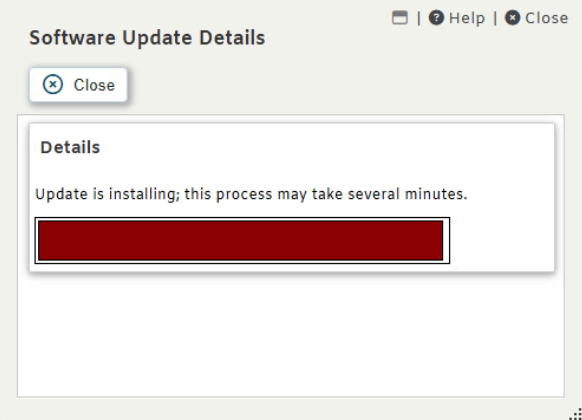
-
-
@Arron,
Previously, there were no issues with updates, and a full server reboot was not required.
OK, I will try
-
-
-
-
-
 Matthew Staff
-
-
-
-
-
Matthew Staff
