This seems to only happen to users (and not even all of them) that have mail profiles signed in with Mdaemon Connector. (some use async some use the connector)
But has anyone had a Zoom call, That when it's accepted, duplicates on the calendar and leaves the tenative one in place as well?
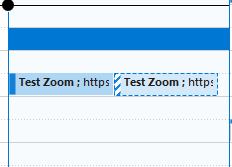
This specific user is using the latest version of the connector, with a 365 Outlook Client Apps for business license.
The zoom meeting was created using the Zoom Desktop application, but sent to him via outlook.
Do the users have the option enabled for "Automatically place new meeting requests on my calendar, marked Tentative"? (Main | Account Manager | Select the Account | Edit | Settings)
If they turn this off, does the problem stop occurring?
Hi Arron, Thank you for your reply. I've actually checked this setting on the user's account on the mail server, it was off already. I didn't change it after that.
What version of MDaemon are you using?
Does the user have the option enabled to Automatically process meeting and cancellation requests? This setting is also found at (Main | Account Manager | Select the Account | Edit | Settings). If its on, turn it off, does the problem continue?
Check the settings for every client accessing the account and turn off any options for creating a tentative event when an invite is received. Then see if the problem continues.
If checking every client is not an option, you can upload a calendar.mrk file from the user's mailbox on the server that has the duplicated event along with the MSG file for the invite from the server and all of the logs for the server for the day the invite was first received and the day the invite was accepted. We'll try to figure out what protocol was used to add the tentative event. Please be sure to let us know the email address of the user account. You can upload all the data to https://mdaemon.sharefile.com/r-rc3922c1eed334d4dbf5e34f0bd04ccd6.
Server 64bit
25.5.1
The user does have that option, it's currently turned off already.
i'll check the client when I can access the user's PC again hopefully today to check the settings. If i can't i'll go on to your next suggestion this afternoon. Thanks for you guidance.
So I figured out a solution, i assume it has something to do with shared calendars between ActiveSync and Mdaemon Connector Profiles not talking to each other via outlook. I noticed this on the user's invite, it said something like
"We couldn't find this meeting in the calendar, it may have been moved or deleted"
(And admittedly i've just started this position using an mdaemon server about two months ago so i don't know much but i'm learning) I do recall hearing Async doesn't work with shared calendars.
When i'd send an invite from outlook via the Zoom addin using my Async profile the error would occur. But when using the Mdaemon Connector profile and sending it, it works just fine. as well do external invites.
So i'm not sure if there is a fix for this, or if you know why this might be occuring, since some users do use activesync it would be nice to fix. But if it's not capable, at least now I know why.
Edit: And to clarfify, there were no actual shared calendars involved.
What vesion of Outlook is being used?
We'll need more information to determine exactly what is occurring in order to try to fix it. I expect what is happening is that a client is creating a tentative event on the user's calendar when an invite is received but some of the unique identifiers are being left out of the event. Then a different client is being used to accept the invite and the system is not able to determine that the tentative event is the same event, so a new one is created.
A copy of the calendar.mrk file from the user's mailbox on the server that has the duplicated event along with the MSG file for the invite from the server and all of the logs for the server for the day the invite was first received and the day the invite was accepted. Will help us to figure out exactly what is happening. Please be sure to let us know the email address of the user account.
 English
 Chinese (Simplified)
 French
 German
 Italian
 Japanese
 Russian
 Spanish
 Vietnamese