SecurityGateway 12.0.1 is now available! It can be downloaded from https://mdaemon.com/pages/downloads-security-gateway-free-trial.
SecurityGateway 12.0.1 - 2026-03-03
FIXES
- [29271] fix to wildcard file masks (e.g., *.PDF) not working as exclusions for the "Quarantine messages that cannot be scanned" AntiVirus feature
- [29221] fix to domain administrators unable to view message logs
- [29222] fix to domain administrator's domain appearing in both available and selected domain lists when editing the user account
- [29306] fix to access control and audit logging in the message log using the viewed user instead of the logged-in session user
Any chance that SPF Exempt List will be added like it is in MD? I have some emails like CrashPlan, Network Solutions, etc that I have my clients MDaemon forward to me and they always fail SPF.
Also, I've seen issues with other clients using SG and running into similar issues with a few people emailing them that fail SPF.
I would recommend looking at ARC signing. Have MDaemon add an ARC signature and have SecurityGateway trust the MDaemon as an arc sealer. Then SecurityGateway will trust the authentication results from the MDaemon server.
https://help.mdaemon.com/SecurityGateway/en/dmarc_verification.html
I'll take a look - but SG is the one that is failing the SPF, are you saying that MD's "settings" will tell SG that it's okay?
if MDaemon adds an ARC seal and SecurityGateway is configured to trust MDaemons ARC seal, then the information from the Autbentication-Results header that MDaemon adds can be used by SecurityGateway. So if the message passed SPF when MDaemon received the message then ARC can be used to allow the message to be treated as if SPF passed when SG receives the message.
A minor thing, but when in SG, I try to Search Settings and search for arc or chain
It doesn't seem to find Authenticated Received Chain (ARC) Verification.
ARC is used in the user interface and in my testing when I search for ARC it returns the correct pages. Chain is not used in the user interface so it does not return any results. Can you post a screen shot of the results you get when searching for arc? The ARC settings are on the DKIM Signing page, so that should be the first page returned in the search results.
I guess I was sorta wrong - searching does find the "signing" setting, just not the "Trust" option, but I see your point.
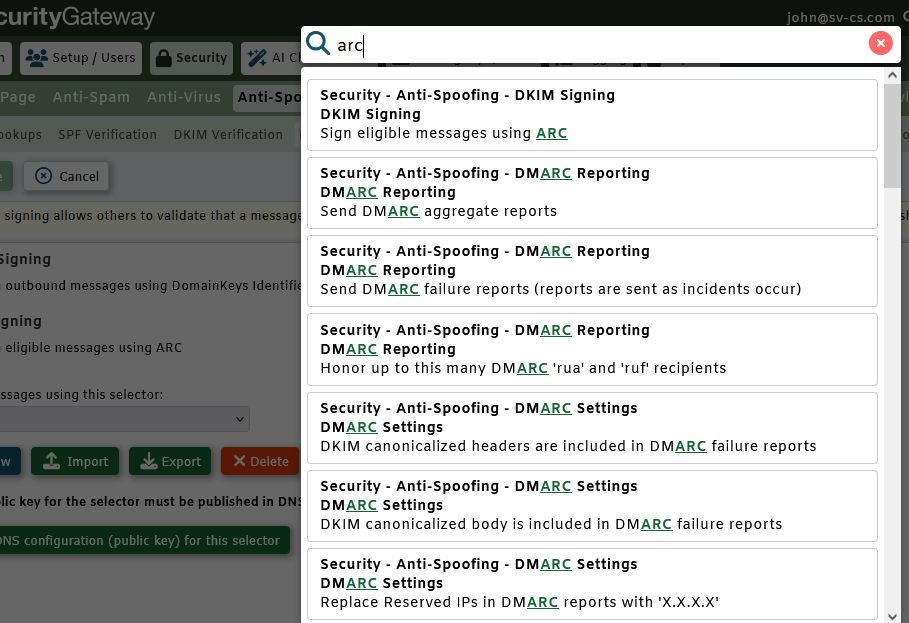
And I didn't check the Trust options, sorry. I'll submit a bug for the developers to review.
@Arron I've got an example of a scam attempt that Display Name Protection did not catch. Would you guys like a copy of the message for testing purposes?
Yes, please. Along with a screen shot of the display name protection settings for the Protected user that should have caused the message to be flagged and a log transcript that shows the message being received. To get the screen shot go to Security | Anti-Spoofing | Display Name Protection. In the Protected Users section, select the user and then click edit. Take screen shots of all the configurations on this dialog.
Please upload everything to https://mdaemon.sharefile.com/r-rc3922c1eed334d4dbf5e34f0bd04ccd6 and let us know the name of the file(s) you upload.
Hi Arron,
I completely missed the need to add users at the bottom of the screen!
I guess it wasn't "missed" since the user wasn't being protected. In any case, I'll still upload the .msg file so you can use it in testing.
Name Spoof.zip
Thanks, we'll take a look.
I ran some tests and in my environment when the user is configured as a protected user for display name protection, the message is correctly flagged.
 English
 Chinese (Simplified)
 French
 German
 Italian
 Japanese
 Russian
 Spanish
 Vietnamese

