 English
 Chinese (Simplified)
 French
 German
 Italian
 Japanese
 Russian
 Spanish
 Vietnamese

Web Conference -> Unable to connect to server
-
Hello,
When I log in to webmail, I get a temporary pop-up message that says “Web Conference Unable To Connect To Server”.
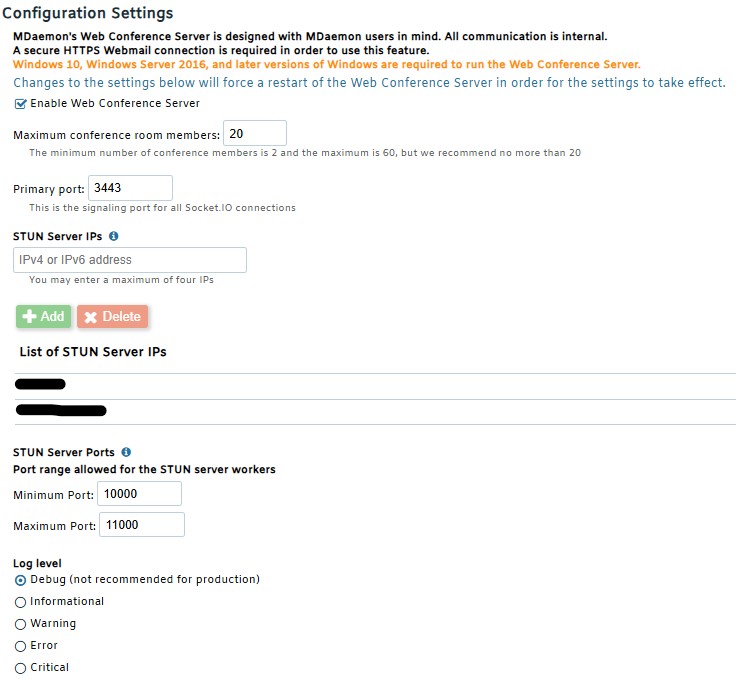
MDaemon is running the latest version (26.0.1) on a Windows Server 2016.Here are the configuration settings, with the local and public IPs defined for the STUN section :
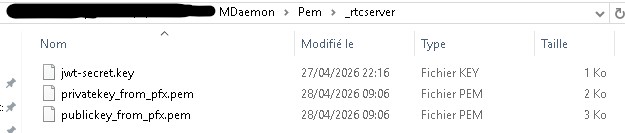
The .pem files are present in the “MDaemon\Pem\_rtcserver” folder :
And finally, here are the logs from the RTCServer-Main.log file :
-----------------------------------------
------- Log Started: Tue Apr 28 2026 09:06:38 GMT+0200 (heure d’été d’Europe centrale)
-----------------------------------------
2026-04-28 09:06:38 | CRITICAL | MDaemon RTC Server starting...
2026-04-28 09:06:38 | CRITICAL | loading directories
2026-04-28 09:06:38 | CRITICAL | Making sure that this is running on the primary node
2026-04-28 09:06:38 | CRITICAL | Loading config file...
2026-04-28 09:06:38 | INFO | Loaded existing JWT secret key
2026-04-28 09:06:38 | CRITICAL | Config loaded
2026-04-28 09:06:38 | DEBUG | Configuration: {"allowRecording":true,"fileTransfer":{"downloadTokenTtlMinutes":10,"enabled":true,"fileRetentionDays":30,"maxUploadBytes":104857600,"permanentDownloadLinks":false},"logLevel":0,"maxConcurrentRecordings":10,"maxRoomPeers":20,"recordingRetentionDays":30,"signalPort":3443,"stunServer":{"announcedIps":["x.x.x.x","y.y.y.y"],"maxPort":11000,"minPort":10000},"turnServer":{"provider":""},"version":"3.0.3","pemDir":"\\MDaemon\\PEM\\_rtcserver","domain":"mail.mydomain.com","logsDir":"\\MDaemon\\Logs","jwtSecret":"thisismysecrew"}
2026-04-28 09:06:38 | DEBUG | FileTransferService initialized {"uploadDir":"\\MDaemon\\RTCServer\\data\\uploads","dbPath":"\\MDaemon\\RTCServer\\data\\ConferenceFiles.db3","pendingTokenTtlMs":300000,"downloadTokenTtlMs":600000,"permanentDownloadLinks":false,"fileRetentionMs":2592000000,"cleanupIntervalMs":43200000}
2026-04-28 09:06:38 | DEBUG | Active rooms file watcher setup failed (file may not exist yet): ENOENT: no such file or directory, watch 'C:\mail\MDaemon\RTCServer\data\active_rooms.json'
2026-04-28 09:06:38 | DEBUG | File transfer database migrated {"now":1777359998087}
2026-04-28 09:06:38 | DEBUG | File transfer database ready
2026-04-28 09:06:38 | DEBUG | Expired file cleanup completed {"removed":0,"total":0,"cutoff":1774767998089}
2026-04-28 09:06:38 | DEBUG | Initializing servers...
2026-04-28 09:06:38 | CRITICAL | No valid HTTPS certificate files found. Extracting MDaemon certificate as fallback.
2026-04-28 09:06:38 | CRITICAL | If you want to use a different certificate, please place the privatekey.pem and publickey.pem files in the \MDaemon\PEM\_rtcserver directory, and restart RTCServer.
2026-04-28 09:06:38 | INFO | Extracting certificate...
2026-04-28 09:06:38 | DEBUG | Certificate extraction output: iniFilePath: ..\App\MDaemon.inistore_location: LocalMachinestore_name: Certificate and private key exported as PFX to credentials/certificate.pfxPEM written to .\credentials\publickey_from_pfx.pemPEM written to .\credentials\privatekey_from_pfx.pem
2026-04-28 09:06:38 | DEBUG | Using extracted certificate files from MDaemon
2026-04-28 09:06:38 | INFO | STUN Servers initialized
2026-04-28 09:06:38 | INFO | Getting active rooms to restore
2026-04-28 09:06:38 | INFO | Signal server running on port 3443
2026-04-28 09:06:38 | DEBUG | No active rooms foundThank you in advance for your help
-
-
-
-
MDaemon will try to figure out what IP addresses to use if you do not specify the STUN server IPs, but its best to always specify them. If MDaemon can't figure out the IPs to use, it will fall back to using FQDN values, which is better than nothing, but it won't work correctly with Firefox.
OK, thanks. I've specified them again.
It is not currently possible to use an alias to send the invite. I'll add a wish list item to be considered for future versions.
Great, I appreciate that consideration
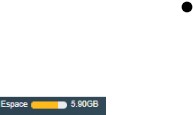
I also just noticed that with the Pro theme, the mailbox quota displayed at the top isn't showing the correct values. In the example below, the mailbox is using 6,038.9 MB out of the 8,000 MB allocated, but it shows a usage value of 5.90 GB instead of 5.90 TB :
-
-
-
