Cyrillic encoding issues and untranslated UI el... | MDaemon Technologies Community Forum

Cyrillic encoding issues and untranslated UI elements


  • Hello,
    I'm using the Russian language interface and noticed a few issues. Some parts of the interface are problematic or untranslated, and there are also Cyrillic character encoding issues. Could you please help look into this?

    Tested on MD 26.5.1 (RU)
    WebAdmin

    1. Issue with Cyrillic
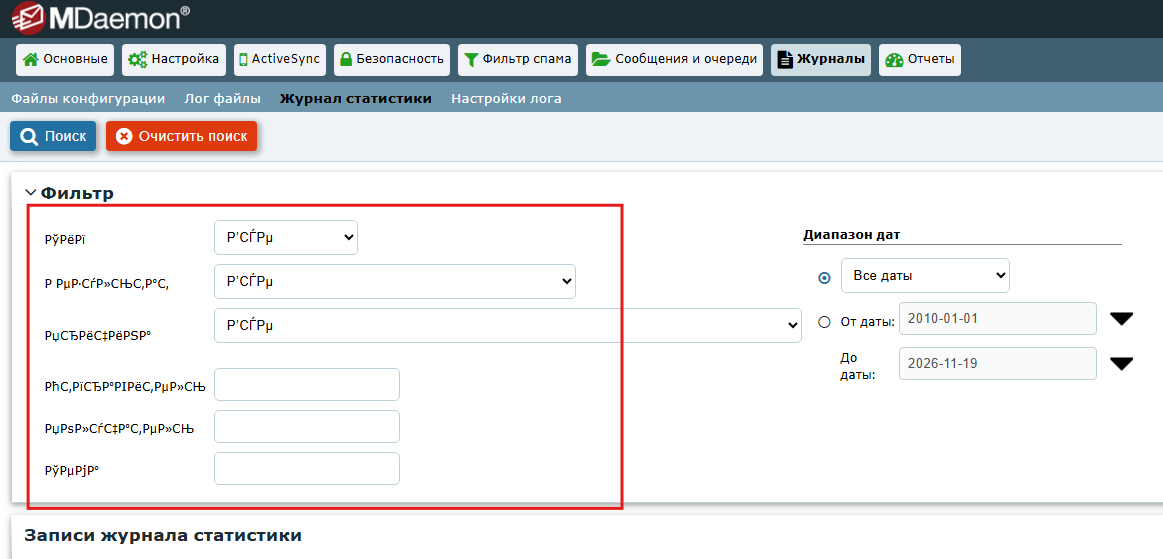

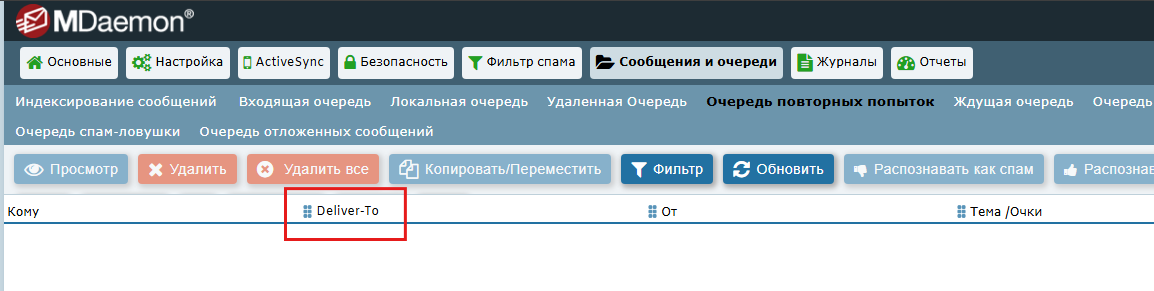
    2. Further untranslated fragments
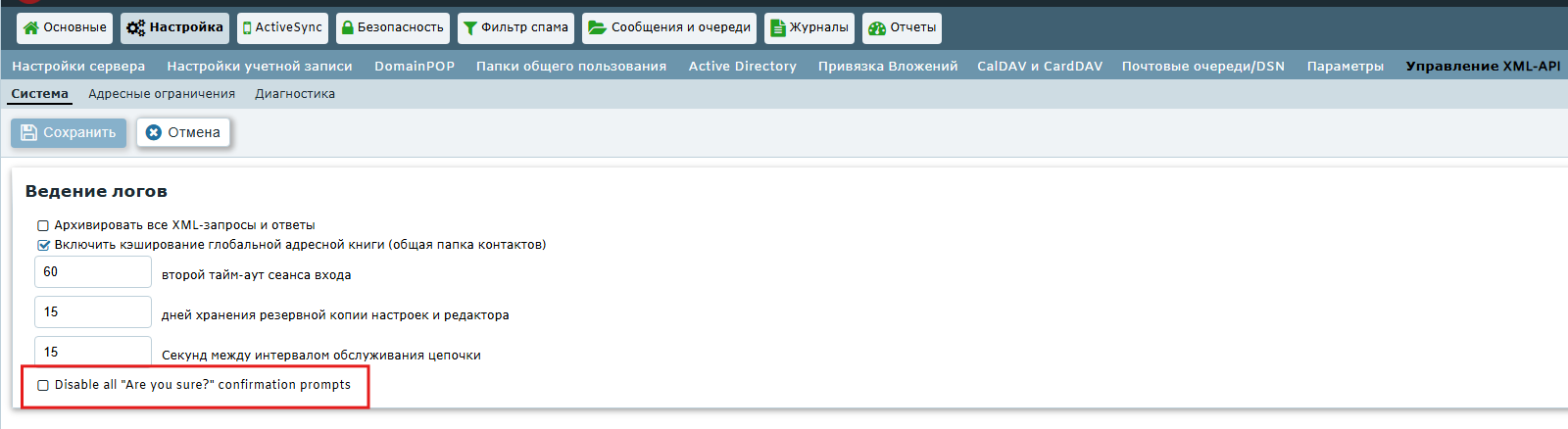
    ---
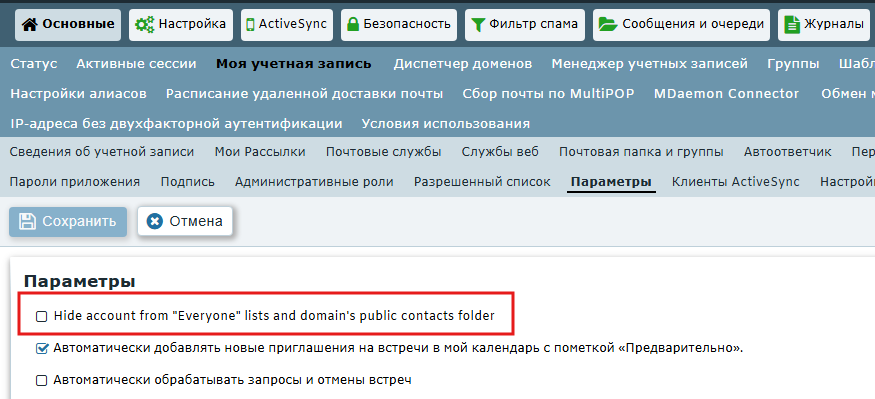

    ---
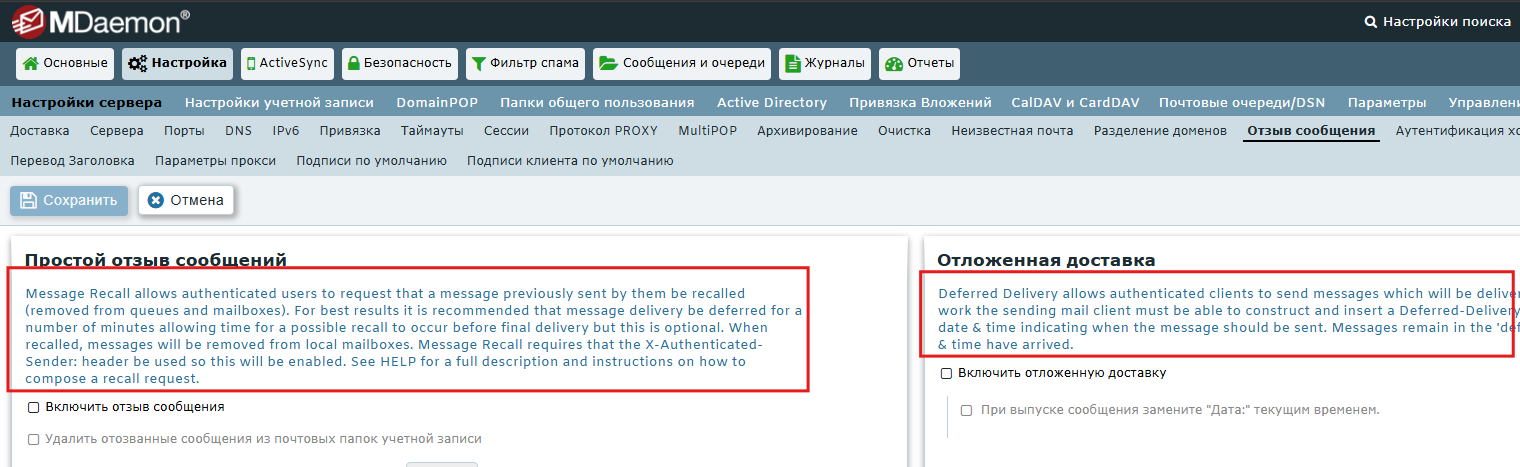
    The description, selection options, and editor elements are not translated.
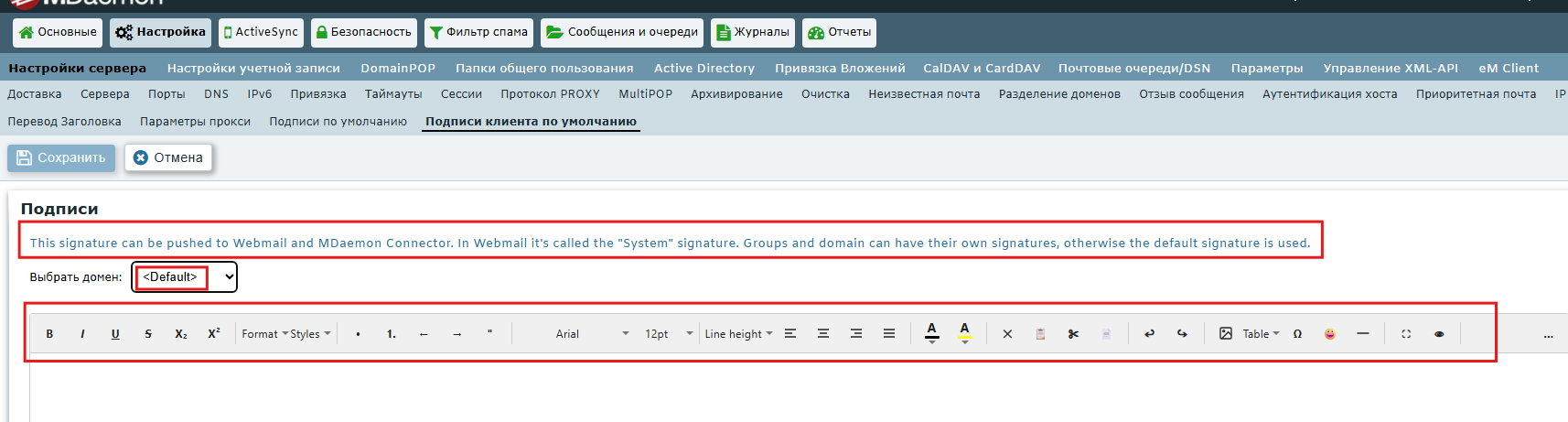
    ---

    ---


    ---
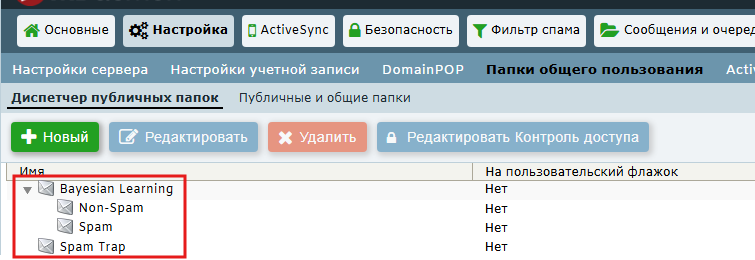
    Folder names are not translated.

    ___


    Sorry for being so pedantic ))

    One more question: have you thought about expanding language support to help grow your reach?

    For instance, a community localization platform where users from different countries help translate the UI and changes are merged into new releases. As an example (not promo), I've used translations.zammad.org


  • Thank you for reporting the issues. 

    I filed 6 bugs for the development team to review. 

    I did not file a bug for the Bayesian Learning and Spam Trap folders. These aren’t interface strings. They are the actual names of folders on disk, and email clients see them with the same names over IMAP, so Remote Administration shows them exactly as they are. You can give them Russian names, as follows:

    1. Stop the MDaemon service, and close the MDaemon application if it’s open.
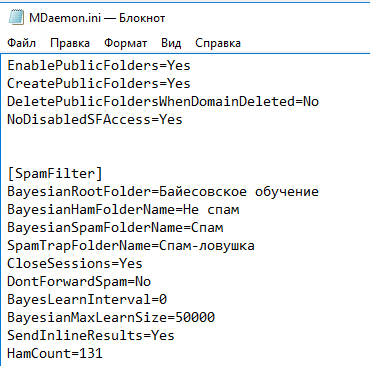
    2. Open MDaemon.ini (by default C:\MDaemon\App\MDaemon.ini) in Notepad. In the [SpamFilter] section, change these four lines:
      BayesianRootFolder=Байесовское обучение
      BayesianSpamFolderName=Спам
      BayesianHamFolderName=Не спам
      SpamTrapFolderName=Спам-ловушка
       
    3. Save the file with ANSI encoding (File › Save As › Encoding: ANSI). Do not save it as UTF-8, or the folder names will be garbled.
    4. Start MDaemon. It creates the new Spam Trap folder automatically.
    5. In Remote Administration, open the Bayesian page under Spam Filter (Спам Фильтр - Байесовский фильтр) and click "Нажмите здесь, чтобы создать папки обучения Байесову Спаму и не спаму" (“Click here to create Bayesian Spam and Ham learning folders”), then Save. This creates the new Bayesian folders and points the learning paths at them.
    6. Move any messages you want to keep from the old English folders into the new ones. Update any Content Filter rules that refer to the old folder paths. Then delete the old folders in the Public Folder Manager (Диспетчер публичных папок).

    Afterwards, the folders on disk will be (assuming the default Public Folders location):

    C:\MDaemon\Public Folders\Байесовское обучение.IMAP\Спам.IMAP
    C:\MDaemon\Public Folders\Байесовское обучение.IMAP\Не спам.IMAP
    C:\MDaemon\Public Folders\Спам-ловушка.IMAP
     

    Cyrillic folder names work because your server’s Language for non-Unicode programs is set to Russian (Control Panel › Region › Administrative › Change system locale). Please keep it set to Russian, and leave “Beta: Use Unicode UTF-8 for worldwide language support” unchecked. If either changes, the Russian folder names will no longer be recognised. Email clients will show the new names after they refresh their folder list. Any spam/non-spam forwarding addresses keep working, because they deliver to whichever folders are configured.

    Thank you again for the report. Please let us know if you have any questions.


  • Thank you for the detailed instructions. I followed every step:
    1. Stopped the MDaemon service and updated the four parameters under [SpamFilter] in MDaemon.ini.
    2. Saved MDaemon.ini strictly in ANSI (Windows-1251) encoding.
    3. Verified the OS regional settings: the server runs Windows Server 2016 with the system locale for non-Unicode programs set to Russian (Russia) (Windows Server 2016 does not have the "Beta: Use Unicode UTF-8" option).
    4. Started MDaemon and recreated the Bayesian learning folders via Remote Administration.

    Here is what happens now (please see the attached screenshots):
    - On disk (C:\MDaemon\Public Folders\), the folders "Байесовское обучение.IMAP" and "Спам-ловушка.IMAP" (along with their subfolders) are created properly with valid Cyrillic names.
    - However, in Remote Administration (Public Folder Manager), those exact folders are displayed as replacement characters (""), matching the exact single-byte character count of the Windows-1251 folder names.

    It looks like Remote Administration's Public Folder Manager reads folder names from the file system in Windows-1251 and renders them directly into the UTF-8 web page without converting the encoding. Could you please forward this to the development team as well?
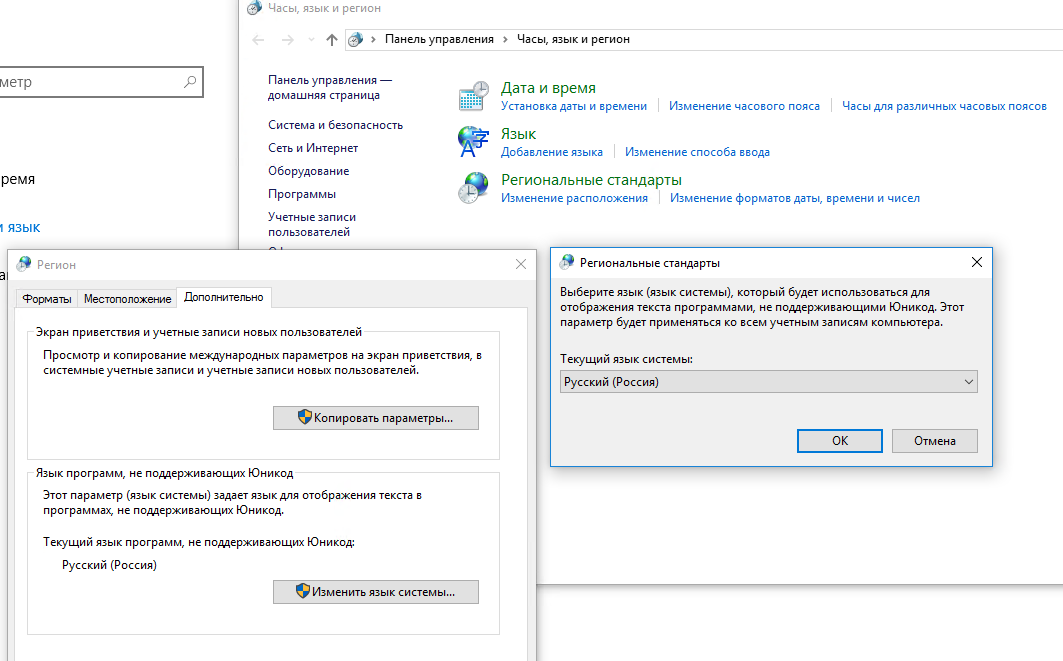
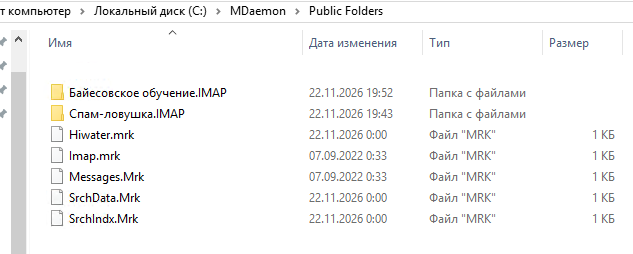
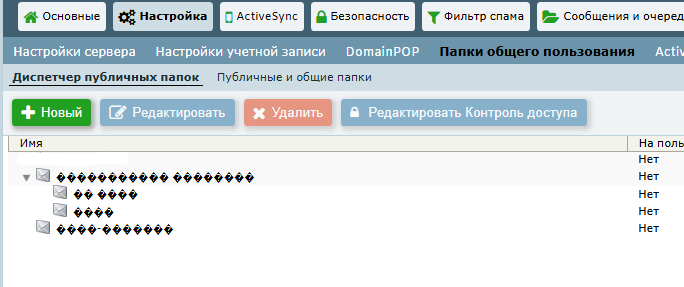


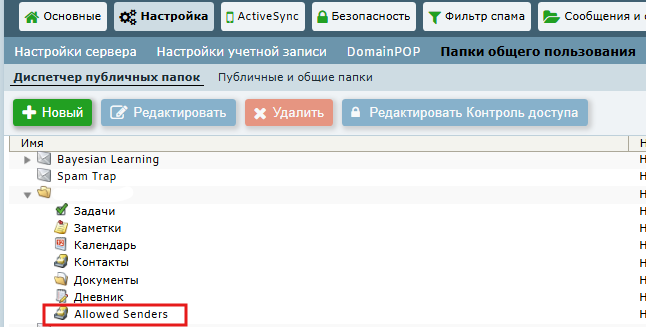
    Additionally, I noticed one more system public folder under our domain that remains in English: "Allowed Senders" (the domain contacts folder used for the White List). I searched the files in C:\MDaemon\App\, and this string only appears inside the compiled binaries (MDaemon.exe and MDCalendar.dll). Is there an undocumented .ini parameter to localize this folder name as well, or is it hardcoded in English?

  • Thank you for following the steps so carefully and for the detailed screenshots. They made it possible to find the cause.  My previous instructions left out a step, sorry about that. 

    Why the folders appear as "�" in Remote Administration

    MDaemon stores public folder names on disk in the standard encoding that IMAP uses for folder names. This is how MDaemon's own translated folders, such as "Задачи" and "Контакты", are stored, which is why they display correctly. Remote Administration, webmail and mail clients all expect folder names in this form.

    MDaemon uses the four [SpamFilter] folder names exactly as they are written in MDaemon.ini. When they are entered as Cyrillic text, the folders are created with names that Remote Administration cannot read. Your Windows settings are correct; the fix is to write the names in MDaemon.ini in the encoded form.

    We have passed this on to our development team so that a future version handles non-English names for these folders automatically.

    How to fix it

    1. Stop the MDaemon service.
    2. Open C:\MDaemon\App\MDaemon.ini.
      • Under [SpamFilter], replace the four lines with:
        BayesianRootFolder=&BBEEMAQ5BDUEQQQ+BDIEQQQ6BD4ENQ- &BD4EMQRDBEcENQQ9BDgENQ-
        BayesianHamFolderName=&BB0ENQ- &BEEEPwQwBDw-
        BayesianSpamFolderName=&BCEEPwQwBDw-
        SpamTrapFolderName=&BCEEPwQwBDw--&BDsEPgQyBEMESAQ6BDA-
         
      • Under [Directories], replace the two Bayesian folder lines with:
        BayesianHamFolder=C:\MDaemon\Public Folders\&BBEEMAQ5BDUEQQQ+BDIEQQQ6BD4ENQ- &BD4EMQRDBEcENQQ9BDgENQ-.IMAP\&BB0ENQ- &BEEEPwQwBDw-.IMAP\
        BayesianSpamFolder=C:\MDaemon\Public Folders\&BBEEMAQ5BDUEQQQ+BDIEQQQ6BD4ENQ- &BD4EMQRDBEcENQQ9BDgENQ-.IMAP\&BCEEPwQwBDw-.IMAP\
         
      • Save the file as ANSI, as before.

      Copy each value exactly. The spaces, the + signs and the double hyphen -- in the Spam Trap name are all part of the name.

    3. In C:\MDaemon\Public Folders\, rename the existing folders. Renaming keeps the messages and access-control settings in them.
      Current name New name
      Байесовское обучение.IMAP &BBEEMAQ5BDUEQQQ+BDIEQQQ6BD4ENQ- &BD4EMQRDBEcENQQ9BDgENQ-.IMAP
      inside it: Не спам.IMAP &BB0ENQ- &BEEEPwQwBDw-.IMAP
      inside it: Спам.IMAP &BCEEPwQwBDw-.IMAP
      Спам-ловушка.IMAP &BCEEPwQwBDw--&BDsEPgQyBEMESAQ6BDA-.IMAP
    4. Start MDaemon. In Remote Administration, open the Public Folder Manager. The folders should now show as "Байесовское обучение" (with "Не спам" and "Спам" inside it) and "Спам-ловушка". Bayesian learning and the Spam Trap use the renamed folders.
    5. If any Content Filter rules refer to these folders, update them to the new folder names. Users who subscribed to these folders in their mail client may need to refresh their folder list.

    About the "Allowed Senders" folder

    The name is not hard-coded. It comes from the WhiteListFolderName setting in C:\MDaemon\WorldClient\Domains.ini, under [Default:UserDefaults] (all domains) or [<your domain>:UserDefaults] (one domain).

    We recommend leaving it as it is. The same setting also names every user's personal "Allowed Senders" folder, and changing it does not rename any folder that already exists. MDaemon starts using new, separate folders under the new name, so the senders already on the domain's and users' allowed lists would no longer be recognised.  If you choose to rename the folder, at the server, you'll want to also rename the every user's person "Allowed Senders" folder.

    If you have any questions, or anything doesn't look right after these steps, please send us a screenshot of the Public Folder Manager.


  • Thank you! Everything worked out, and I really appreciate your help and detailed guidance.

    I would also like to ask about WorldClient translations — are you considering adding support for new languages?

    I have translated the entire WorldClient interface across all themes into Ukrainian. If your team is interested, I would be happy to share the translation files for integration, completely free of charge.


  • That is very generous, adding Ukranian was not on our list, but we'll take a look.  Can you upload the files to 

    https://mdaemon.sharefile.com/r-rc3922c1eed334d4dbf5e34f0bd04ccd6

    Thank you!


  • Downloaded.
    The archive is titled: UKR_Deploy_MDeamon_26.5.1.rar

    Thank you, you have a very cool product and great support!


  • We will take a look, Thank you!


Please login to reply to this topic!