English
 Chinese (Simplified)
 French
 German
 Italian
 Japanese
 Russian
 Spanish
 Vietnamese


MDaemon 26.5.0 – WorldClient feedback (bugs, UI remarks and positives)
-
Hello everyone,
We installed the MDaemon 26.5.0 update yesterday morning (our interface is in French). I prepared this post before seeing that 26.5.1 had been released. I'll install it as soon as possible to check whether some of my issues are already fixed, and I'll update this thread with the results.
I'm still sharing our feedback below.
Bugs
-
The default calendar view is ignored. In the calendar customization settings, I set the "Default calendar view" option to "Week". When I open the calendar, it still shows the "Month" view.
-
Searching in all folders returns nothing. There is no error message, just no results. I saw a forum topic about this, and it may be fixed in 26.5.1. I haven't tested it yet.
-
Suggested contacts can't be selected with a laptop touchpad. When composing an email, I type the first 3 letters of a contact and the auto-suggestion list appears. When I left-click a suggestion with the touchpad, the contact is not selected and only the 3 typed letters remain. With a mouse, there is no problem.
This depends on Settings → Composition → Default compose location: 2 of the 3 modes have this problem, and only the "Modal window" mode works correctly with the touchpad.
Minor issues / suggestions
- Dark theme: unread emails are hard to spot. The bold is not pronounced enough, and a read email and an unread email have the same background. A clearer difference (stronger bold, a different background or an indicator) would greatly improve readability.
- Double-clicking a calendar event does not let me edit its options.
- I can no longer have mail and calendar open in two browser tabs. Previously, I could open the calendar in a new tab with a middle-click (mouse wheel).
- There is no "Print" shortcut button when composing an email.
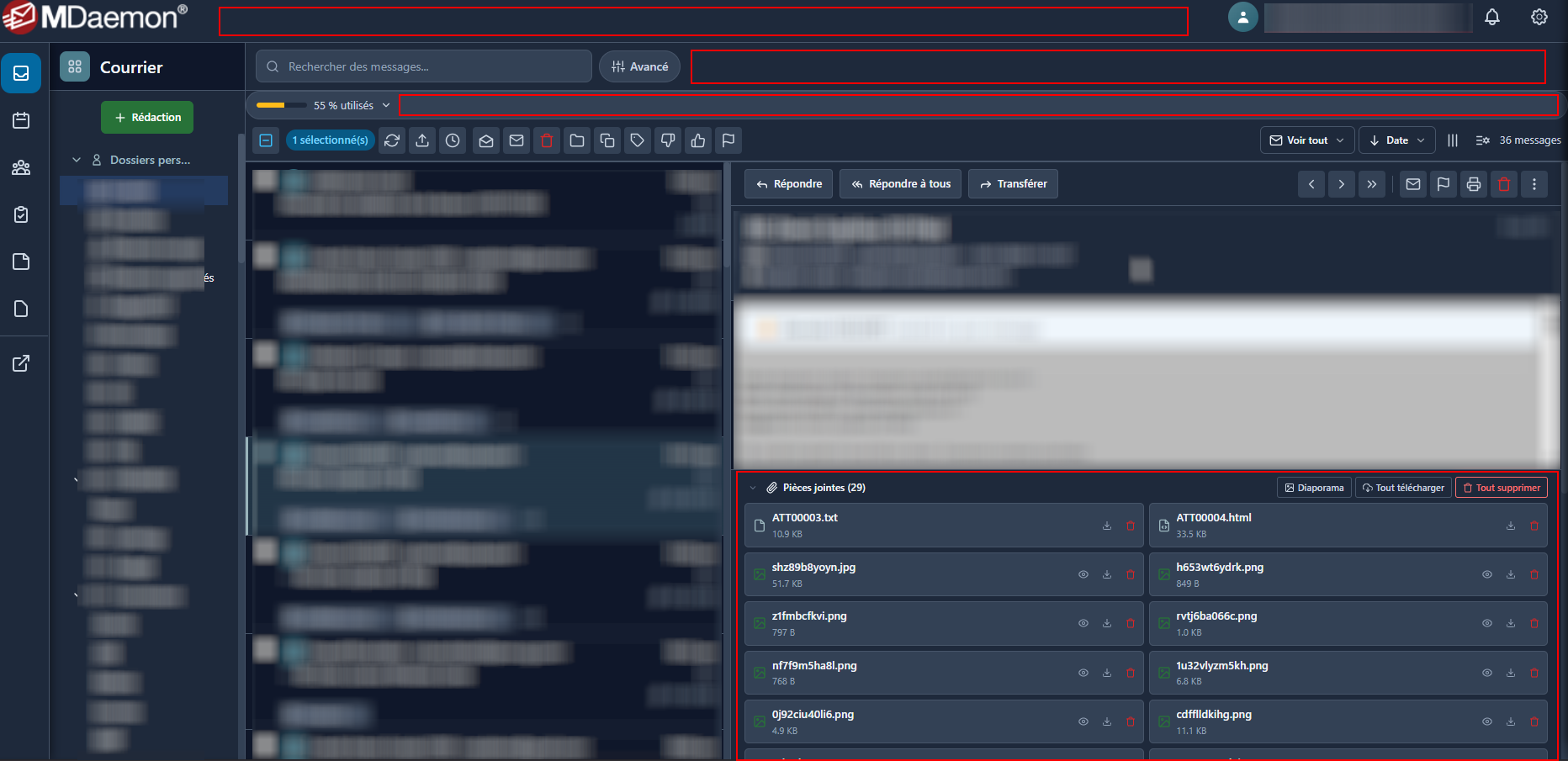
- The workspace wastes space:
-
- At the top of the screen, a lot of space is unused (areas outlined in red on the first screenshot).
- When reading an email, the attachments area takes up too much room.
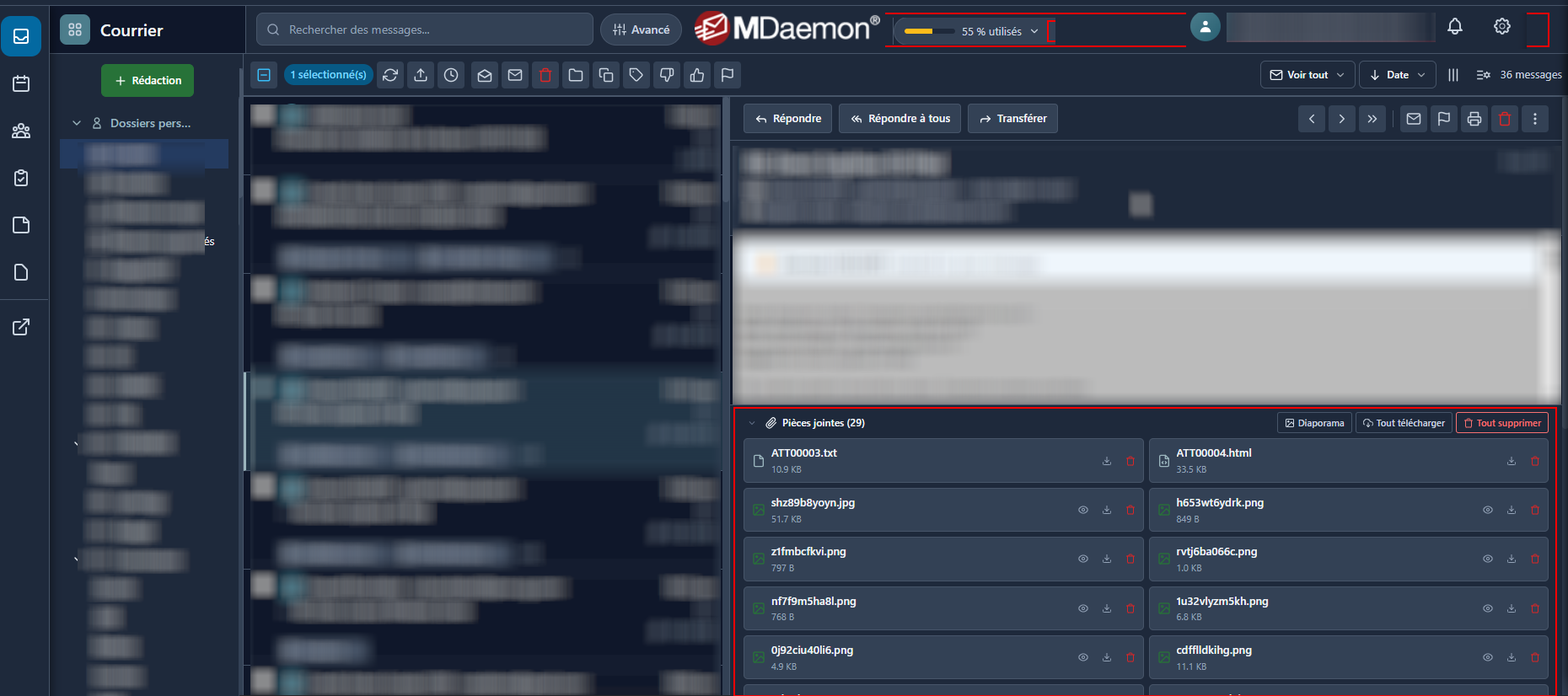
- The second screenshot is a quick mock-up showing how the top area could be more compact. For example, the logo, the search bar and the quota indicator could fit on the same line.
Positives
- Overall, the new general presentation is a success.
- The webmail now supports external ICS calendars.
- Thank you for adding PROXY protocol support (I'll test it later).
Next steps
I'll upgrade to 26.5.1 very soon and retest these points, then report back here.
Thanks to the MDaemon team for the work, and thanks in advance for your feedback!
Bonjour à tous,
Nous avons installé la mise à jour MDaemon 26.5.0 hier matin (interface en français). J'ai préparé ce message avant de voir que la 26.5.1 soit sortie. Je vais l’installer au plus vite pour vérifier si certains de mes soucis sont déjà corrigés, et je mettrai ce sujet à jour avec les résultats.
Je vous expose quand même nos remontés :
Bugs- La vue par défaut du calendrier n’est pas prise en compte. Dans la personnalisation du calendrier, je choisis la vue « Semaine » pour l’option « Vue du calendrier par défaut ». Quand j’ouvre le calendrier, il reste sur la vue « Mois ».
- La recherche dans tous les dossiers ne renvoie rien. Il n’y a pas de message d’erreur, mais aucun résultat. J’ai vu un sujet sur le forum à ce propos, et cela pourrait être corrigé dans la 26.5.1. Je n’ai pas encore testé.
- Impossible de sélectionner un contact suggéré avec le touchpad d’un ordinateur portable. En rédigeant un mail, je tape les 3 premières lettres d’un contact et la liste d’auto-suggestion apparaît. Quand je clique sur une suggestion avec le bouton gauche du touchpad, le contact n’est pas sélectionné et seules les 3 lettres saisies restent. À la souris, aucun problème.
Cela dépend de Paramètres → Rédaction → Emplacement de composition par défaut : 2 modes sur 3 ont ce problème, et seul le mode « Fenêtre modale » fonctionne correctement au touchpad.
Points mineurs / suggestions
- Thème sombre : les mails non lus sont difficiles à repérer. La mise en gras est trop peu marquée, et un mail lu et un mail non lu ont le même fond. Une différence plus nette (gras plus marqué, fond différent ou indicateur) améliorerait beaucoup la lisibilité.
- Un double-clic sur un événement du calendrier ne permet pas de modifier ses options.
- Impossible d’avoir le mail et le calendrier ouverts dans deux onglets du navigateur. Avant, je pouvais ouvrir le calendrier dans un nouvel onglet avec un clic molette.
- Pas de bouton raccourci « Imprimer » lors de la rédaction d’un mail.
- L’espace de travail fait perdre de la place :
-
- En haut de l’écran, beaucoup d’espace est inutilisé (zones encadrées en rouge sur la première capture).
- Dans la lecture d’un mail, la zone des pièces jointes prend trop de place.
- La seconde capture est une maquette rapide montrant comment la zone du haut pourrait être plus compacte. Par exemple, le logo, la barre de recherche et l’indicateur de quota pourraient tenir sur la même ligne.
Points positifs
- Globalement, la nouvelle présentation générale est réussie.
- Le webmail gère désormais les calendriers externes ICS.
- Merci pour l’ajout de la prise en charge du protocole PROXY (je le testerai plus tard).
Suite
Je vais passer en 26.5.1 très prochainement et retester ces points, puis je reviendrai ici avec mes retours.
Merci à l’équipe MDaemon pour ce travail, et merci d’avance pour vos retours !
-
-
-
-
-
-
-
-
-
-