There is a small bug with web calendar. I create a meeting in my web calendar, then I change the time in outlook. And after deleted it from web interface. Attendees received notification without delete item from calendar.(item at the top of email body)
Version of md server 24.5.0, and client Ms office 2016.
Let me make sure I understand. These are the steps you are taking correct?
- Create a meeting in webmail
- Change the time in Outlook
- Go back to webmail and delete the meeting
When you do this, attendees still receive the notification about the meeting time changing even though you've already deleted the meeting from webmail. Is that correct?
What is the time frame between steps 2 and 3?
What is the expected behavior? If you modify the time of an event in Outlook, a meeting update should be sent. If you then delete the meeting from a different email client, another meeting update should be sent.
Arron, yes this steps is correct. After i deleted the meeting from webmail, attendees receive this notification.
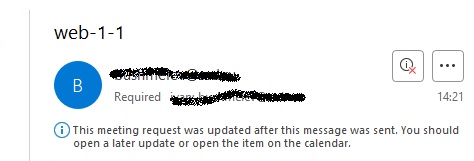
i waiting 5 minutes between steps 2 and 3. I forgot to write the test accounts are working on active sync protocol.
I was hoping that such a notification would come, as shown in the picture below. With "remove from calendar" button. Because I am changing the meeting from one account, just different devices.
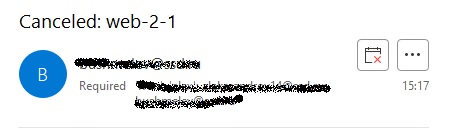
P.S. I've just noticed if I'm deleting from outlook my attendees receive two notifications, one with "remove from calendar" button, and the second as in the first picture. i think after i deleted the meeting from webmail the correct notification is not being received? Maybe there's a magic check box somewhere?)
Arron, yes this steps is correct. After i am deleted the meeting from webmail, attendees receive this notification "This meeting request was updated after after this message was sent. You should open a later update or open the item on the calendar".
i waiting about 5 minutes between steps 2 and 3. I forgot to write the test accounts are working on active sync protocol.
I was hoping such a notification would come, be With "remove from calendar" button. Because I am changing the meeting from one account, just different devices.
And a little bit, If I'm deleting meeting from outlook my attendees receive two notifications, one with "remove from calendar" button, and the second as in post above. I think after i deleted the meeting from webmail the correct notification is not being received? Maybe there's a magic check box somewhere?)
little piece of information, In notification without "remove from calendar" button, parameter "SEQUENCE" is 0. But zero, this is the initial meeting? In the correct notification, for me "SEQUENCE" parameter is equal to 2, for example.
So far I have been unable to reproduce the issue. What theme are you using in webmail?
If you don't change the time of the event in outlook, and just delete it from webmail, is the meeting cancellation email sent?
Are there any references to the meeting cancellation email in the routing or content filter logs? Can you reproduce the issue again and then upload the MDaemon system, routing, raw, content filter and webmail logs that include the time period when you reproduced it so I can see what is occuring?
You can upload files to https://mdaemon.sharefile.com/r-rc3922c1eed334d4dbf5e34f0bd04ccd6
Once the files are uploaded, please let us know the name of the file(s) you uploaded.
WEbmail theme - LookOut. Yes, if everything is done in the web interface, even if transfer, attendees receive one correct notification.
Uploaded files
HTTP-2025-04-17.log
MDaemon-2025-04-17-Content-Filter.log
MDaemon-2025-04-17-RAW.log
MDaemon-2025-04-17-Routing.log
When I test this, the attendees receive two notifications, which is the expected behavior. The first is an update to the meeting that shows the change in time. The second is the meeting cancelation.
Here are the steps that I'm taking.
- Login to webmail as user1@domain.com using the Lookout theme
- Create a meeting and invite user2@domain.com
- Login to webmail as user2@domain.com and accept the invitation
- Open Outlook that is connecting to user1@domain.com using ActiveSync
- Modify the time of the meeting, I made the start time 1 hour later
- Login to webmail as user1@domain.com using the lookout theme
- Delete the meeting.
What am I doing different than you? Or what am I not understanding correctly?
If the issue you are reporting is that there are 2 meeting updates sent to the attendees, there is no way in this scenario for there to be a single notification sent. The ActiveSync client is responsible for sending the meeting update for the change made in Outlook. This notification is immediately generated by the ActiveSync client.
All actions are correct, but my attendee receive one notification arrives, without the delete from calendar button. And that's the issue, you must to go to the calendar, look for a meeting and delete it.
The logs show that Ivan and Alex are both received meeting cancellations for the web-only-1, web-only-2, web-outl-1, and web-outl-2 meetings. Is there a different meeting I should be looking at?
In your testing, which meeting was the cancellation notice not received for? Which user(s) did not receive it?
What clients are being used to access the mailbox? Are those clients configured with any rules that may be moving, deleting, or automatically trying to process the cancellation?
These meetings are quite enough. Web-only - all changes were made in the web interface, all users received correct notifications. Web-outlook - meeting created in web interface, changed in outlook and cancelled in web interface. All users receive one notification without the delete from calendar button.
I tested the meeting organizer in outlook 2016, and attendee on various versions of outlook 2016, 2019, 2021 with active sync protocol for all tested users including the organizer, and everywhere the issue was repeated. No one active content filter rules.
The MDaemon logs show the the Meeting cancellations were placed into the users mailboxes. Here is an example with real names, addresses and paths obfuscated, that show the message being placed into the inbox of ax@domain.ru:
Thu 2025-04-17 09:40:23.538: 12: LOCAL message: pd5001000003866.msg
Thu 2025-04-17 09:40:23.538: 12: * From: bv@domain.ru
Thu 2025-04-17 09:40:23.538: 12: * To: ax@domain.ru
Thu 2025-04-17 09:40:23.538: 12: * Subject: Cancelled: web-outl-1
Thu 2025-04-17 09:40:23.538: 12: * Message-ID: <MDAEMON2827202504170940.AA4018459@domain.ru>
Thu 2025-04-17 09:40:23.538: 12: * Archived: (archives)\domain\out\bv@domain.ru\arc5001000000453.msg
Thu 2025-04-17 09:40:23.538: 12: * Archived: (archives)\domain.ru\in\ax@domain.ru\arc5001000000035.msg
Thu 2025-04-17 09:40:23.538: 12: * Size: 1516; <\mdaemon\users\domain.ru\ax\md5001000000037.msg>
This log snippet also shows that the archiviving feature in MDaemon created copies of the message, so you should be able to find it in your archives.
Does \mdaemon\users\domain.ru\ax\md5001000000037.msg still exist in the user's mailbox?
If it doesn't exist, then something must have moved it. The most likely explanation is that a client moved it. What clients are accessing the ax account? Is it just Outlook via ActiveSync? What does the ActiveSync log show happened around that time?
 English
 Chinese (Simplified)
 French
 German
 Italian
 Japanese
 Russian
 Spanish
 Vietnamese

