Hi,
I've very new to MDaemon and I'm currently evaluating for a potential migration from another popular self hosted email server.
We have always used IMAP and on our current solution new accounts always have the following folders created.
Inbox,Sent,Trash,Drafts,Spam
When creating a new account in MDaemon and connecting to it with our prefered client (Thunderbird) I see only the following folders.
Inbox, Trash.
Is there somewhere I can set additional default folders for new accounts? Forgive me if a little niaive but I would have thought the sent folder would be a default?
TIA
Hello,
Thank you for trying out MDaemon.
When using an IMAP client, it's up to the client to create the folders it wants to use. I set up an account with Thunderbird to double-check the behavior. The IMAP folders you mentioned were not created initially, but as I composed an email and saved a draft, the folder was created on the first use. The same with the Sent folder.
Have you tested doing your normal activities with an account? Thunderbird should create the folders.
One note: For a new account, Thunderbird did not have the option to move Junk messages to a folder enabled by default (Right click the account in Thunderbird, click Settings, and go to Junk Settings), so you will need to manually set that up for each user.
You can choose to enable the option in MDaemon to move messages to the user spam folders automatically and deal with Spam on the server level. In the MDaemon Remote Administration site, if you log in with a global admin account, you can find the setting under Spam Filter | Filter Settings | Settings under "Move spam into user's IMAP spam folder automatically." When you enable that, you will see a dialog that says MDaemon will create the folder for all of your users if you choose to do so.
I hope this is helpful, please let us know if you have any further questions.
@Leigh Thanks for taking the time to investige and replicate. I tried exactly as you said before posting thinking it might be down to the client to create the folders but for me Thunderbird kept reverting to using the local Sent folder. I ended up creating a Sent folder in Thunderbird manually and then changing the setting under Accounts and it worked. I don't really want to have to do this on every endpoint though if I can help it.
I will investigate the spam settings soon too but we usually use a global spam folder which is hidden and we also use some scripts to block certain extentions. We have puplic folders setup with rules that move them into these folders and the folders are only vivible to specified IT users.
For reference we are currently using hMailServer for which development has been stopped so are looking for an alternative. Can you tell me is it possible to migrate from hMailServer i.e. import data from SQL?
So, I've been testing a little again today and for me the imap folders are not created automatically. If I look at Copies & Folders in account settings and set any option to "XX" Folder on user@domain it does not retain the setting.
For instance I set Drafts and Templates Like so ..
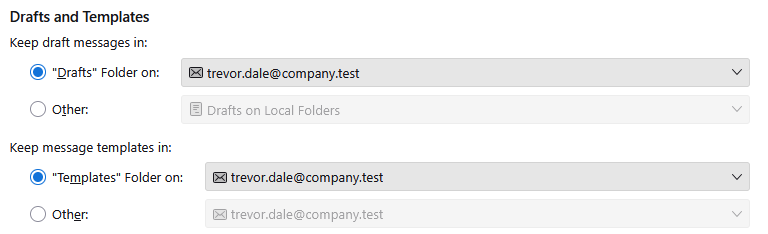
This setting is not retained when saving a message in Thunderbird and it reverts to saving in the local Drafts folder?
If I create a Drafts folder manually in Thunderbird, change the setting and then save as a draft it works just fine. This is the same for all folders such as mentioned in the OP.
TIA
Can you tell me is it possible to migrate from hMailServer i.e. import data from SQL?
If you can export data from hMailServer into RFC822 format, it can be imported into MDaemon.
If hMailServer supports ActiveSync, you can use the ActiveSync Migration Client to migrate the mailbox data. You can find documentation for MDaemon\App\ASMC.exe at MDaemon/Docs/ActiveSync Migration Client.html
If you'd prefer to use a UI instead of a command line utility you can run MDaemon\app\ASMCUI.exe.
There are also numerous free third-party IMAP migration tools available on the internet that you can use.
This setting is not retained when saving a message in Thunderbird and it reverts to saving in the local Drafts folder?
I would recommend that you look for assistance from Thunderbird directly regarding this issue, as I do not have any specific information that would assist you with the behavior of their application.
 English
 Chinese (Simplified)
 French
 German
 Italian
 Japanese
 Russian
 Spanish
 Vietnamese

