Could someone point me in the direction of a tutorial or guide for adding a html signature at any level. The help says "Cut and Paste from your favourite html editor".
I cannot make this work!
What are you attempting to use as your signature? If you can share the HTML you have, I can try to help adjust it so it will work.
Which signatures are you using? I generally reccomend the client signatures as the placement of those signatures will be better than the signatures that MDaemon attempts to insert. And the client signatures can be used by any client, you just have enter a MACRO value as the signature in the client and then MDaemon will replace it with the actual signature.
Here is an example of the client signature we are using:
-- <br>
<strong>$CONTACTFULLNAME$</strong>
<br>$CONTACTBUSINESSTITLE$
<br><strong>o</strong>: 817-601-3222
<strong>e</strong>: $CONTACTEMAILADDRESS$<br><br>
<span style=" font-size: 16pt;"><strong>M</strong>Daemon Technologies</span><br>
<span style="font-weight: bold; font-size: 10pt;">Simple Secure Email</span>
<br><br>
Visit us on <a style="color: #006699;" href="https://www.mdaemon.com">www.mdaemon.com</a> |
<a style="color: #006699;" href="https://www.facebook.com/MDaemon.Technologies/">Facebook</a> |
<a style="color: #006699;" href="https://www.linkedin.com/company/mdaemon-technologies">LinkedIn</a> |
<a style="color: #006699;" href="https://www.youtube.com/c/MDaemonTechnologies">YouTube</a>
<br>Sent using the <a style="color: #006699;" href="https://www.mdaemon.com/">MDaemon Email Server</a></div>
@Arron Thanks for the example I will have a play with this tomorrow. I've been trying to add signatires at both the server and domain levels as didn't really want to add a signature for every account!
Hi, so I'm making some progress but having some odd results. It seems (probably obviously) that Thunderbird is not cooperating the same as something like eM Client but I guess I need to figure out how to configure Thunderbird to play ball properly. We are researching migration from another mail server solution so are looking to replicate our exisiting setup as close as possible.
I'm hoping to achieve a signature something like this which we add with our existing mail server.
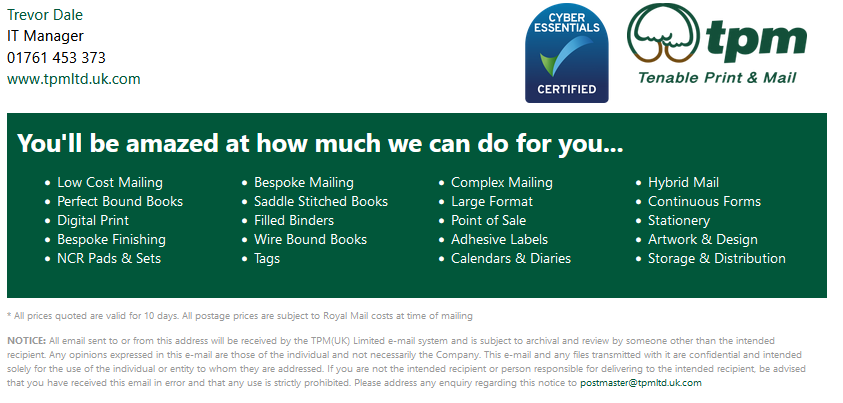
And this is the existing HTML.
<!DOCTYPE html>
<html lang="en">
<head>
<meta charset="UTF-8">
<meta http-equiv="X-UA-Compatible" content="IE=edge">
<meta name="viewport" content="width=device-width, initial-scale=1.0">
<title>TPM UK LTD</title>
<style>
a {text-decoration: none; color:#01573a; font-weight: 500;}
body{font-family:'Segoe UI', Tahoma, Geneva, Verdana, sans-serif;}
h2{margin-top:1px; margin-bottom: 1px;}
.header{
width:800px;
max-width:100%;
padding-right: 10px;
padding-bottom: 10px;
overflow: auto;
}
.main-body{
width:800px;
max-width:100%;
background-color: #01573a;
padding: 10px;
color:#ffffff;
}
ul.no-bullets {
list-style-type: none;
padding: 0;
margin: 0;
line-height:1.40em;
margin: 20px 0 10px 0;
float: left;
font-size:.9em;
}
ul.services {font-size: smaller;}
.disclaimer{
font-size: xx-small;
width: 800px !important;
max-width: 100% !important;
color: #999;
}
.tpmgreen {color: #01573a;}
.main-body ul {
margin: 1em 0 1.5em 0;
}
.logo {
float: right;
margin-top: 20px;
padding-left: 10px;
}
</style>
<style media="screen and (min-width: 1025px)">
.main-body ul {
-moz-column-count: 4;
-moz-column-gap: 28px;
-webkit-column-count: 4;
-webkit-column-gap: 28px;
column-count: 4;
column-gap: 28px;
}
</style>
<style media="screen and (max-width: 1024px)">
.main-body ul{
-moz-column-count: 3;
-moz-column-gap: 20px;
-webkit-column-count: 3;
-webkit-column-gap: 20px;
column-count: 3;
column-gap: 20px;
}
</style>
<style media="screen and (max-width: 768px">
.main-body ul{
-moz-column-count: 2;
-moz-column-gap: 10px;
-webkit-column-count: 2;
-webkit-column-gap: 10px;
column-count: 2;
column-gap: 10px;
font-size: 0.7em;
}
h2{font-size: 1em;}
</style>
</head>
<body>
<div class="header">
<ul class="no-bullets">
<li class="tpmgreen">%User.FirstName%</li>
<li>%User.LastName%</li>
<li>01761 453 373</li>
<li><a href="https://www.tpmltd.uk.com">www.tpmltd.uk.com</a></li>
</ul>
<a href="https://www.tpmltd.uk.com"><img class="logo" src="https://www.tpmltd.uk.com/images/tpmtenable.png" alt="TPM UK LTD" width="180px" height="80px"></a>
<a href="https://registry.blockmarktech.com/certificates/2f0d0737-90b8-4244-841c-0ce2bb98bdaa/active/"><img class="logo" alt="Cyber Essentials logo" src="https://registry.blockmarktech.com/certificates/2f0d0737-90b8-4244-841c-0ce2bb98bdaa/email-image/?width=100&height=100" width="100" height="100" oncontextmenu="return false;"/></a>
</div>
<div class="main-body">
<h2>You'll be amazed at how much we can do for you...</h2>
<ul class="services" style>
<li>Low Cost Mailing</li>
<li>Perfect Bound Books</li>
<li>Digital Print</li>
<li>Bespoke Finishing</li>
<li>NCR Pads & Sets</li>
<li>Bespoke Mailing</li>
<li>Saddle Stitched Books</li>
<li>Filled Binders</li>
<li>Wire Bound Books</li>
<li>Tags</li>
<li>Complex Mailing</li>
<li>Large Format</li>
<li>Point of Sale</li>
<li>Adhesive Labels</li>
<li>Calendars & Diaries</li>
<li>Hybrid Mail</li>
<li>Continuous Forms</li>
<li>Stationery</li>
<li>Artwork & Design</li>
<li>Storage & Distribution</li>
</ul>
</div>
<div class="disclaimer">
<p>* All prices quoted are valid for 10 days. All postage prices are subject to Royal Mail costs at time of mailing</p>
<p><strong>NOTICE:</strong> All email sent to or from this address will be received by the TPM(UK) Limited e-mail system and is subject to archival and review by someone other than the intended recipient. Any opinions expressed in this e-mail are those
of the individual and not necessarily the Company. This e-mail and any files transmitted with it are confidential and intended solely for the use of the individual or entity to whom they are addressed. If you are not the intended recipient
or person responsible for delivering to the intended recipient, be advised that you have received this email in error and that any use is strictly prohibited. Please address any enquiry regarding this notice to postmaster@tpmltd.uk.com</p>
</div>
</body>
</html>
I'm assuming I will need to convert to using inline styles rather than an included css?
TIA
When you save this HTML, it will attempt to create a text signature based off the HTML, I'm guessing you are going to want to adjust the Text version. Also, the HTML editor for the signature does not show it properly. But when I open webmail and compose a new email the signature looks very close to the original. You may have to tweak it some though.
I changed the macros to the most likely option. Update them to your preferred macros. Also, remember it uses the default public contacts for the domain to populate the macros. You'll want to make sure your user accounts are automatically populated in the domain.com\Calendar public folder. You can find a full list of available macros in the help file.
<div style="width:800px;max-width:100%;padding-right:10px;padding-bottom:10px;overflow:auto;font-family:'Segoe UI', Tahoma, Geneva, Verdana, sans-serif;">
<ul style="list-style-type:none;padding:0;margin:20px 0 10px 0;line-height:1.40em;float:left;font-size:.9em;">
<li style="color:#01573a;">$CONTACTFIRSTNAME$</li>
<li>$CONTACTLASTNAME$</li>
<li>01761 453 373</li>
<li><a href="https://www.tpmltd.uk.com" style="text-decoration:none;color:#01573a;font-weight:500;">www.tpmltd.uk.com</a></li>
</ul>
<a href="https://www.tpmltd.uk.com">
<img src="https://www.tpmltd.uk.com/images/tpmtenable.png" alt="TPM UK LTD" width="180px" height="80px" style="float:right;margin-top:20px;padding-left:10px;">
</a>
<a href="https://registry.blockmarktech.com/certificates/2f0d0737-90b8-4244-841c-0ce2bb98bdaa/active/">
<img src="https://registry.blockmarktech.com/certificates/2f0d0737-90b8-4244-841c-0ce2bb98bdaa/email-image/?width=100&height=100" alt="Cyber Essentials logo" width="100" height="100" oncontextmenu="return false;" style="float:right;margin-top:20px;padding-left:10px;">
</a>
</div>
<div style="width:800px;max-width:100%;background-color:#01573a;padding:10px;color:#ffffff;font-family:'Segoe UI', Tahoma, Geneva, Verdana, sans-serif;">
<h2 style="margin-top:1px;margin-bottom:1px;">You'll be amazed at how much we can do for you...</h2>
<ul style="font-size:smaller;margin:1em 0 1.5em 0;column-count:3;column-gap:20px;">
<li>Low Cost Mailing</li>
<li>Perfect Bound Books</li>
<li>Digital Print</li>
<li>Bespoke Finishing</li>
<li>NCR Pads & Sets</li>
<li>Bespoke Mailing</li>
<li>Saddle Stitched Books</li>
<li>Filled Binders</li>
<li>Wire Bound Books</li>
<li>Tags</li>
<li>Complex Mailing</li>
<li>Large Format</li>
<li>Point of Sale</li>
<li>Adhesive Labels</li>
<li>Calendars & Diaries</li>
<li>Hybrid Mail</li>
<li>Continuous Forms</li>
<li>Stationery</li>
<li>Artwork & Design</li>
<li>Storage & Distribution</li>
</ul>
</div>
<div style="font-size:xx-small;width:800px;max-width:100%;color:#999;font-family:'Segoe UI', Tahoma, Geneva, Verdana, sans-serif;">
<p>* All prices quoted are valid for 10 days. All postage prices are subject to Royal Mail costs at time of mailing</p>
<p><strong>NOTICE:</strong> All email sent to or from this address will be received by the TPM(UK) Limited e-mail system and is subject to archival and review by someone other than the intended recipient. Any opinions expressed in this e-mail are those of the individual and not necessarily the Company. This e-mail and any files transmitted with it are confidential and intended solely for the use of the individual or entity to whom they are addressed. If you are not the intended recipient or person responsible for delivering to the intended recipient, be advised that you have received this email in error and that any use is strictly prohibited. Please address any enquiry regarding this notice to postmaster@tpmltd.uk.com</p>
</div>
In case its helpful, here is a screen shot of the signature in webmail, before I updated the macros.

@Arron Thank you once again. I guess I may just have to play arount with it to get something more acceptable and maybe redesign it to suit! What is the best approach to creating rich html looking sigantures on MDaemon? Is it better to create them with the text designer or to do them in HTML. I've tended to always use style sheets for my HTML and it seems in MDaemon this us probably not the best approach!
When you created yours with my code did you get something similar to this?
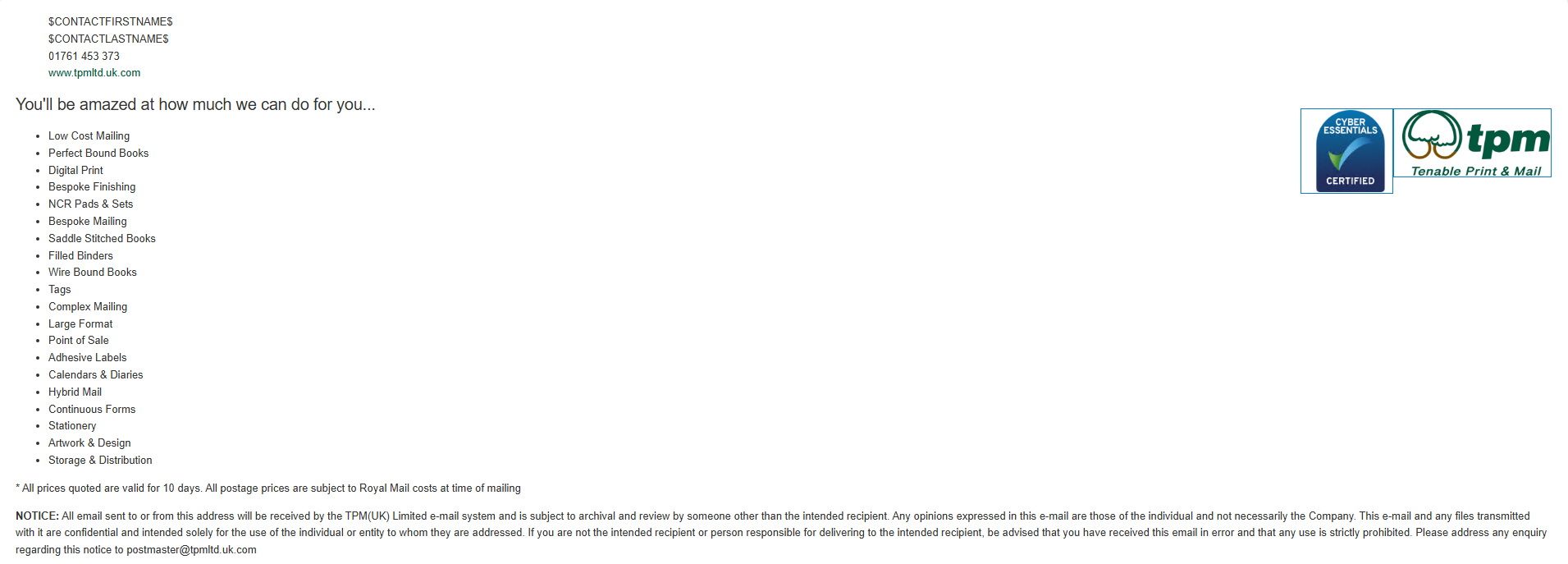
@Arron Ah, would this make a difference if we're not using webmail? We don't generally use webmail for our clients but desktop clients like Thunderbird, Outlook etc.
@Trevor Yes, when I viewed the signature in the HTML editor for the signature, that is exactly what it looked like and I thought I had done something wrong. Then I looked at it in webmail and realized the editor just was not showing it correctly. I used webmail because it was readily available, most other mail clients should display the signature in a similar manner, although it may not be identical. To check the signature in thunderbird, set your signature to be $CLIENTSIGNATURE$ and send an email.
@Trevor
Using the "Signatures" means that MDaemon will try to determine where to place the signature when it gets the email. This is difficult, and to be honest MDaemon is not very good at it. Most of the time you will end up with the signature at the bottom of an email thread. This is not ideal.
The better option, in my opinion, is to use the Client Signatures section (Main | Domain Manager | Select the Domain | Edit | Client Signatures). If you are using webmail, it automatically sets the signature for the users. If you are not using webmail, then you set the signature in the email client to be $CLIENTSIGNATURE$ and when MDaemon processes the message, it will replace $CLIENTSIGNATURE$ with the actual signature that you have configured. This allows for signatures to be placed in the correct location in the email every time.
@Arron Got it, thank you very much! I know signatures is a bit of a contentious area now especially with spam and GDPR etc but I know our company like to use them for some minor marketing so I need to be able to offer a solution.
I really appreciate your help btw!
I'm much closer. I'm now getting this....
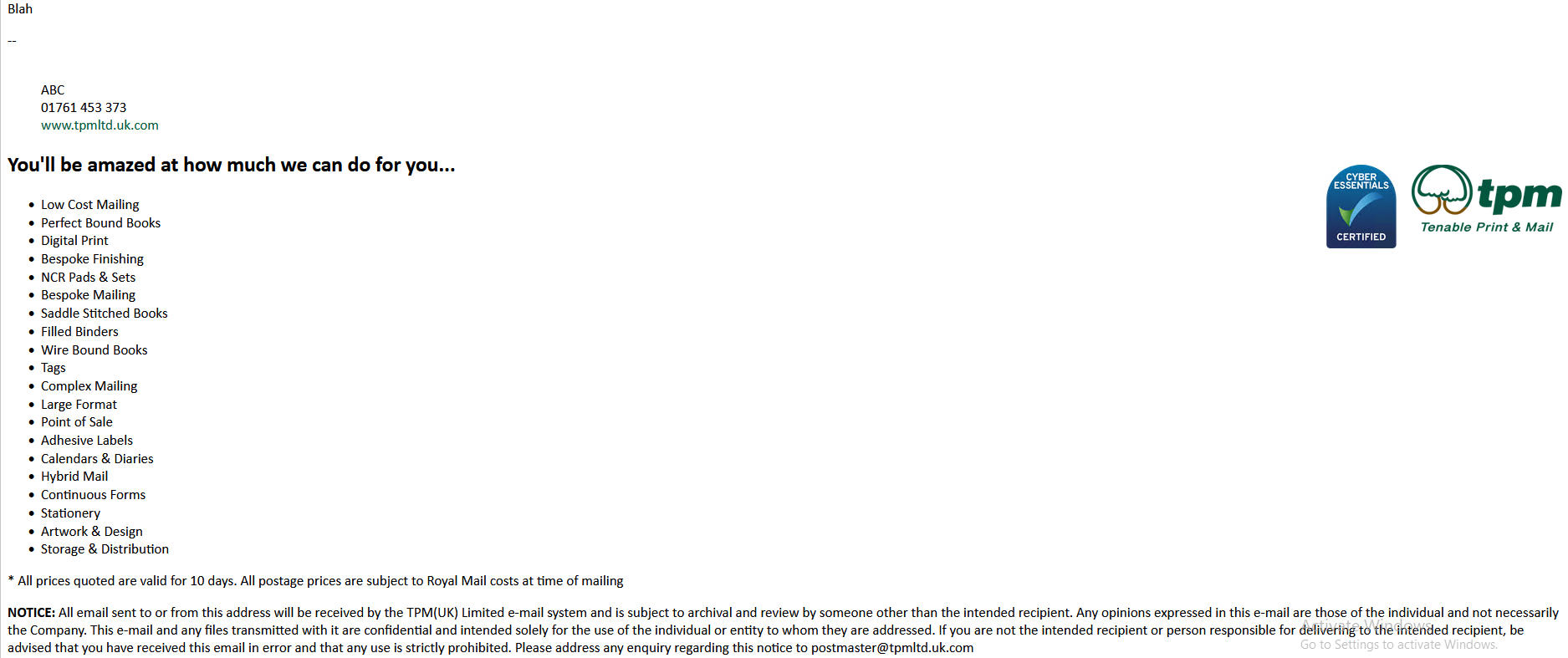
I guess I just need to play with the source or text now to get it to display correctly!
Thank you once again!
@Trevor I think the HTML editor messed up the signature. Lets start try entering it again a slightly different way.
Main | Domain Manager | Select the domain | Edit | Client Signatures
Click the down arrows to expand the menu of the HTML editor
Click the source button
Paste the HTML source for your signature.
Click Save and Close.
Then try sending another test message.
I tested with Thunderbird (I sent the email from thunderbird to the same account and viewed the signature in thunderbird) and here is the signature I'm currently getting with the HTML provided.
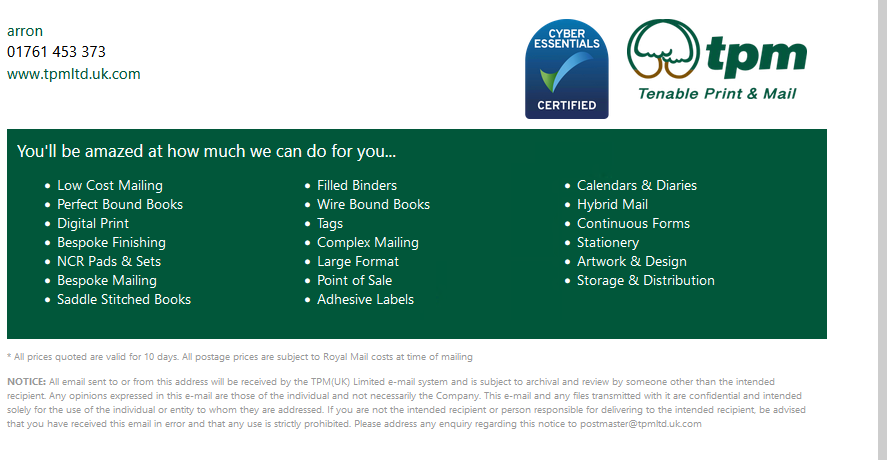
@Arron Caruth Just finally on this I hope. So I now have this and think I can work with it ....

A couple of observations.
1. Are the -- included in the signature as part of adding $CLIENTSIGNATURE$ in the email client?
2. I've noticed when adding HTML with lots of styles using your Editor in the webui that when you "Save & Close" or "Apply" then close upon entering the Editor again most of the style attributes are missing but the signature still displays as intended (not in the text Editor). Is this just a UI bug? I'm assuming I'll just need to keep a reference copy of the required signatures to reapply them if needed as editing them in the MDAemon ui seems almost impossible!
Thanks again for your assistance with this!
1. In many email systems, two dashes followed by a space (`-- `) are used to indicate the separation between the body of an email and the signature. This convention is widely recognized by email clients and is often used to automatically hide the signature when replying to emails, preventing it from being included in the quoted text. But the macros doesn't force the use of it. If you include the two dashes followed by a space in your signature, either in the email client, or in the MDaemon, then it will be included.
2. I've had some issues with the HTML editor this morning as well, and have submitted a bug on it for the developers to review.
In regards to the -- in the signature, it looks to me like Thunderbird is adding it.
@Arron Caruth Thank you so much for all of your assistance and tolerence today. So far so good with everything about MDaemon. I always knew it would be a bit of a learning curve coming from our current solution and we have a fair bit more testing to do but the response on this forum alone has been fantastic!
Keep up the great work!
@Trevor
Thank you! Sorry for the hassles with the signatures.
@Arron Do you know of any progress or response from your developers with the UI for HTML signature editing? I know these things take time and I'm not asking if it's been done just where it was acknowledged. Is there somewhere to track known bugs or planned enhancements for future versions? I guess this would be classed as a minor non important bug anyway!
TIA
The HTML in the signature is sanitized, so some of the styles are being removed intentionally. For example, we don't allow a <HEAD> tag in the HTML signature. Also, it does not currently support CSS, all styles need to be inline.
We have changed the HTML sanitization to allow <MAP> and <AREA> tags. Probably not the changes you are looking for.
In addition, I haven't been able to determine steps to consistently reproduce an issue (unless its a tag we are intentionally removing). If you have steps that consistently produce a problem, please let us know.
We do not have a publicly available tool for tracking bugs, but you are welcome to join our MDaemon beta team if you'd like to see what is coming.
https://mdaemon.com/pages/beta-program
 English
 Chinese (Simplified)
 French
 German
 Italian
 Japanese
 Russian
 Spanish
 Vietnamese

