Hi Paul,
You should not need to restart MDaemon when adding an address to an exclusion list as long as you are doing it from the MDaemon GUI or the MDaemon Remote Admin website (MDRA).
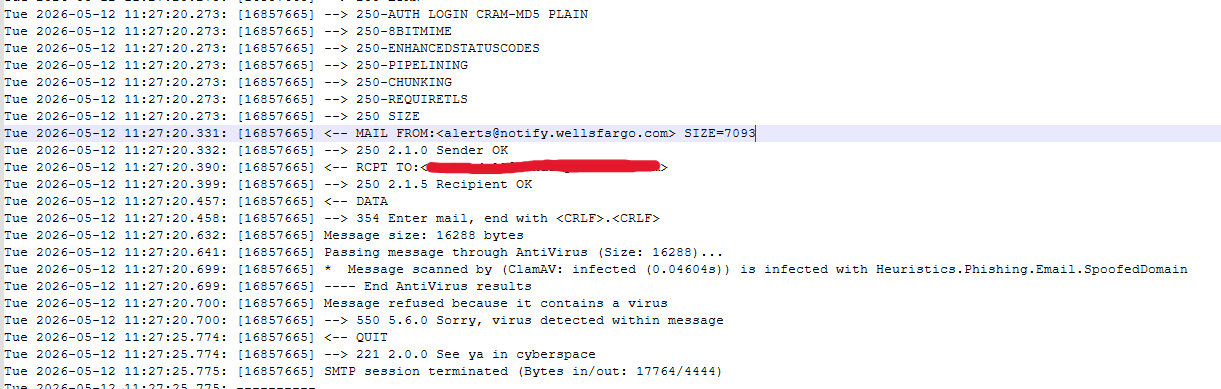
The message ClamAV is giving is not technically for a virus, it thinks the message contains a phishing attempt. From my searching, a lot of banks fail this test for some reason. If you wish to disable it altogether you can go to Windows Explorer on the server, and go to C:\MDaemon\SecurityPlus\ClamAVPlugin\conf (by default, or wherever your path to MDaemon is) and open clamd.conf in a text editor.
Look for:
# Scan URLs found in mails for phishing attempts using heuristics.
# Default: yes
#PhishingScanURLs yes
If you wish to disable this scan altogether, you can remove the # from in front of PhishingScanURLs to un-comment the line (it's enabled by default so that's why it's working though the line is commented out) and change the yes to no.
So:
# Scan URLs found in mails for phishing attempts using heuristics.
# Default: yes
PhishingScanURLs no
Then save the file. Since you are changing this outside of MDaemon's GUI or MDRA, then you will need to restart MDaemon for it to pick up this change.
Alternatively, if you wish to keep this enabled and continue to try and get the exclusion to work, I have a few more questions.
Under the AntiVirus exclusions is three separate sections: Global Address Exclusions, Sender File Exclusions, and Recipient File Exclusions. Are you entering the address in all three sections there? And if so, are you entering the bank's email address or the recipient's address?
What I would recommend is to enter the bank address used in the MAIL FROM line in the log file to the "Exclude messages FROM these addresses Ex: *@company.test" section of the Global Address Exclusions. Test to see if that makes a difference.
If that does not resolve the issue, I would recommend that you submit a support request via https://mdaemon.com/pages/support-request-form so that you can submit more extensive logs for us to take a look at and assist you.
Let me know if you have any questions.
 English
 Chinese (Simplified)
 French
 German
 Italian
 Japanese
 Russian
 Spanish
 Vietnamese