 English
 Chinese (Simplified)
 French
 German
 Italian
 Japanese
 Russian
 Spanish
 Vietnamese

Calendar Publishing Feature Not Working
-
We are experiencing an issue with the calendar publishing feature in MDaemon.
Despite the following configurations being in place, users are not seeing the option to publish their calendar via URL when using the LookOut theme:
-
EnableCalendar=YesandCanPublishCalendars=Yesare both set in[Default:UserDefaults] -
The Webmail theme in use is LookOut, confirmed by
KeyMap=LookOut -
The file
WC.INIalso contains per-domain and per-user sections confirming the same permissions -
We attempted adding
EnableCalendarPublishing=Yesmanually as well -
Caches were cleared, different browsers tested, and the MDaemon service restarted
Despite all of this, the “Publish Calendar” feature does not appear in the Webmail interface.
We are using MDaemon version 24
-
-
The Webmail theme in use is LookOut, confirmed by
KeyMap=LookOutThe KeyMap entry stores the keymap, not the theme. The key that stores the default theme is "Theme"
The file
WC.INIalso contains per-domain and per-user sections confirming the same permissionsThe worldclient.ini file should not have per-domain and per-user sections. They should only be in the domains.ini file.
We attempted adding
EnableCalendarPublishing=Yesmanually as wellI can't find where this key is used for anything.
I tested using MDaemon 24.0.0 and in the Lookout theme I'm able to publish a calendar by going to Options / Folders, click the Share folder icon next to the calendar folder you'd like to share and then click the Public Access tab.
It should look similar to this:

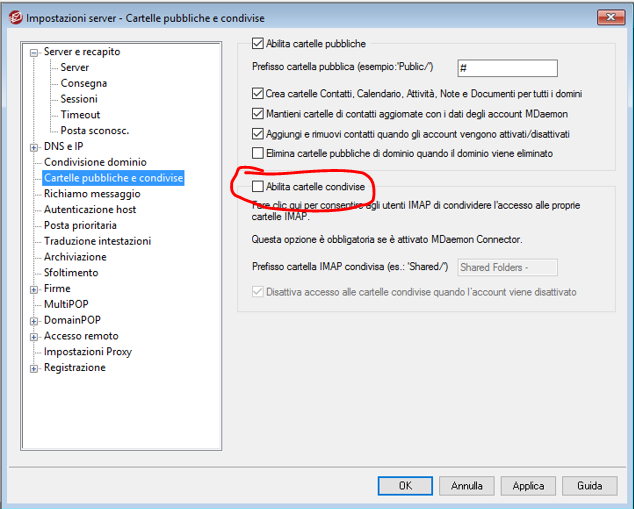
If the Share Folder column is empty, it means you do not have shared folders enabled. Open the MDaemon user interface and go to Setup / Public Folders / Public & Shared Folders and check the box for Enable Shared folders. Then log out of webmail and log back in.
Also check to ensure:
- the MDaemon\WorldClient\Domains.ini file [Default:Settings] section has this set, EnablePublicCalendars=Yes
- the MDaemon\Users\$DOMAIN$\$MAILBOX$\WC\User.ini file does NOT have this set, CanPublishCalendars=No
If you are still not able to publish a calendar:
- What is the exact version of MDaemon you are using?
- Are users able to publish a calendar using the WorldClient theme?
- What steps is the user taking in the lookout theme to attempt to publish the calendar?
- Please upload a copy of your MDaemon\app\mdaemon.ini, MDaemon\WorldClient\worldclient.ini, MDaemon\WorldClient\domains.ini, MDaemon\Users\$DOMAIN$\$MAILBOX$\WC\User.ini for the user that is attempting to publish the calendar, and a copy of the webmail log that includes the time period that the user attempted to publish the calendar. Also let us know the email address of the user and the approximate time they attempted to publish it, so we can find it in the logs. Put all the info in a zip file and upload it to https://mdaemon.sharefile.com/r-rc3922c1eed334d4dbf5e34f0bd04ccd6, once the upload is complete, let us know the name of the file you uploaded.
-
-
-
-
You must enable Shared folders. To do that, check the box circled in red in this screen shot.
-
-
