Hello,
Currently, everyone uses different email signature but we are trying to unify them.
When I read the "Knowledge base" it saids, if we use signatures on domain level, users signature would be over-written but it not doing that. unless I mis-read something. (The first part with my name is what is in my signature and the bottom is whats inside domain signature.)
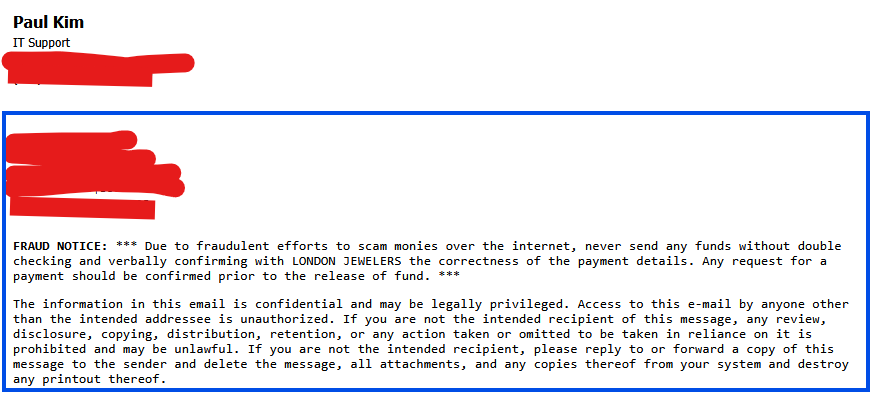
How can we lock individual users signature so that they can't be used?
I also see we can use macros to automatically fill in name, title, and phone numbers. Where can we add this info so that we could use macros?
any help would be greatly appreciated.
Thank you.
Hi Paul,
Are your users all using WorldClient? If so, in MDaemon Remote Administration, you can go to Webmail Settings | Settings and uncheck "Allow user-created signatures"
You can find the same setting in MDaemon's console under Setup | Web & IM Services | Webmail | Settings.
If your users are using a mail client like eMClient, Outlook, or Thunderbird, then it is more a matter of communicating with your users to allow the admins to set the signatures at the server level, because mail clients add the signature the user configures from the application as a part of the message body, and that can make it difficult to detect and remove them with a content filter.
I also see we can use macros to automatically fill in name, title, and phone numbers. Where can we add this info so that we could use macros?
If you go to MDaemon's help file, and view the topic Signatures under Setup Menu | Domain Manager, it lists the macros you can use there. As stated in the help file:
MDaemon signatures support macros that insert the sender's contact information into the signature, taken from the sender's contact located in its domain's Public Contacts folder. This allows default and domain signatures to be personalized with the sender's information. $CONTACTFULLNAME$, for example, inserts the sender's full name, and $CONTACTEMAILADDRESS$ inserts the sender's email address. Use Webmail, MDaemon Connector, or ActiveSync to edit the public contacts. Blank values are used if no contact exists for the sender.
I hope that is helpful, please let us know if you have any further questions.
Thank you for your reply.
would there be a way to export all contact info, bulk edit and import it back into Mdaemon?
We currently have all field empty, other than name, email, and few other things. Would like to find the fasted way to do this.
Thank you.
Any user that has sufficient permissions to the public contact folder should be able to export and then import the data. How to do this will vary depending on the client you are using. If you are using webmail you can export to a CSV file by going to Contacts, selecting the public contact list for your domain, right click and select export. To import the data select Import instead of Export in the right click menu. The user you are logged into webmail with must have sufficient permissions to export and then import the data.
To export the from webmail contacts the user needs to have read access. To import the contacts using webmail the user needs to have write and insert access.
Thank you for your reply.
Exactly the information I was looking for.
I just exported and imported the contacts and after importing, now I see 2 of all contacts.
How do I go about fixing this?
also, We wanted to add title, business name and phone but its not showing up.
are these the correct macros?
$CONTACTBUSINESSCOMPANY$
$CONTACTBUSINESSTITLE$
$CONTACTBUSINESSPHONE$
Thank you.
How do I go about fixing this?
Delete all the contacts in the public contact list and re-import from the CSV file.
are these the correct macros?
Whether they are the correct macros depends on what field you are trying to pull information from.
Business Name = $CONTACTBUSINESSCOMPANY$
Business Title = $CONTACTBUSINESSTITLE$
Business Phone = $CONTACTBUSINESSPHONE$
You can find all the macros in the help file.
https://help.mdaemon.com/MDaemon/en/domain-manager_signatures.html
 English
 Chinese (Simplified)
 French
 German
 Italian
 Japanese
 Russian
 Spanish
 Vietnamese

